The box
Hardware and system setup of the Tiny Jukebox box as it runs today. The installer produces exactly this setup, by itself
with one line or run by the Ansible playbook, which adds what only the developer needs (deployment.md,
sections 3 and 5); day-to-day administration is in operations.md. The box holds its software in slots
and updates itself from the library (library.md, section 6); what differs on a box set up without slots
(tinyjukebox_slots: false) is said where it applies.
1. Hardware
| Part | Type |
|---|---|
| Computer | Raspberry Pi 3 Model B Rev 1.2, 1 GB RAM (WLAN 2.4 GHz only, Bluetooth 4.1) |
| SD card | 32 GB is sufficient (system about 3 GB, albums 8.5 GB) |
| Amplifier | Pimoroni Audio Amp SHIM (MAX98357A, I2S, mono, 3 W) with speaker |
| RFID reader | RC522 module on SPI0, 3.3 V |
| Controls | 4 buttons against GND, 1 RGB LED |
| Power | power bank; the box is switched off by cutting the power |
| Clock | none (no RTC): the time is correct only after the box has had WLAN |
Data sheets: docs/hardware/. The circuit and the printed parts:
hardware/. The pins of the circuit are those of the table below.
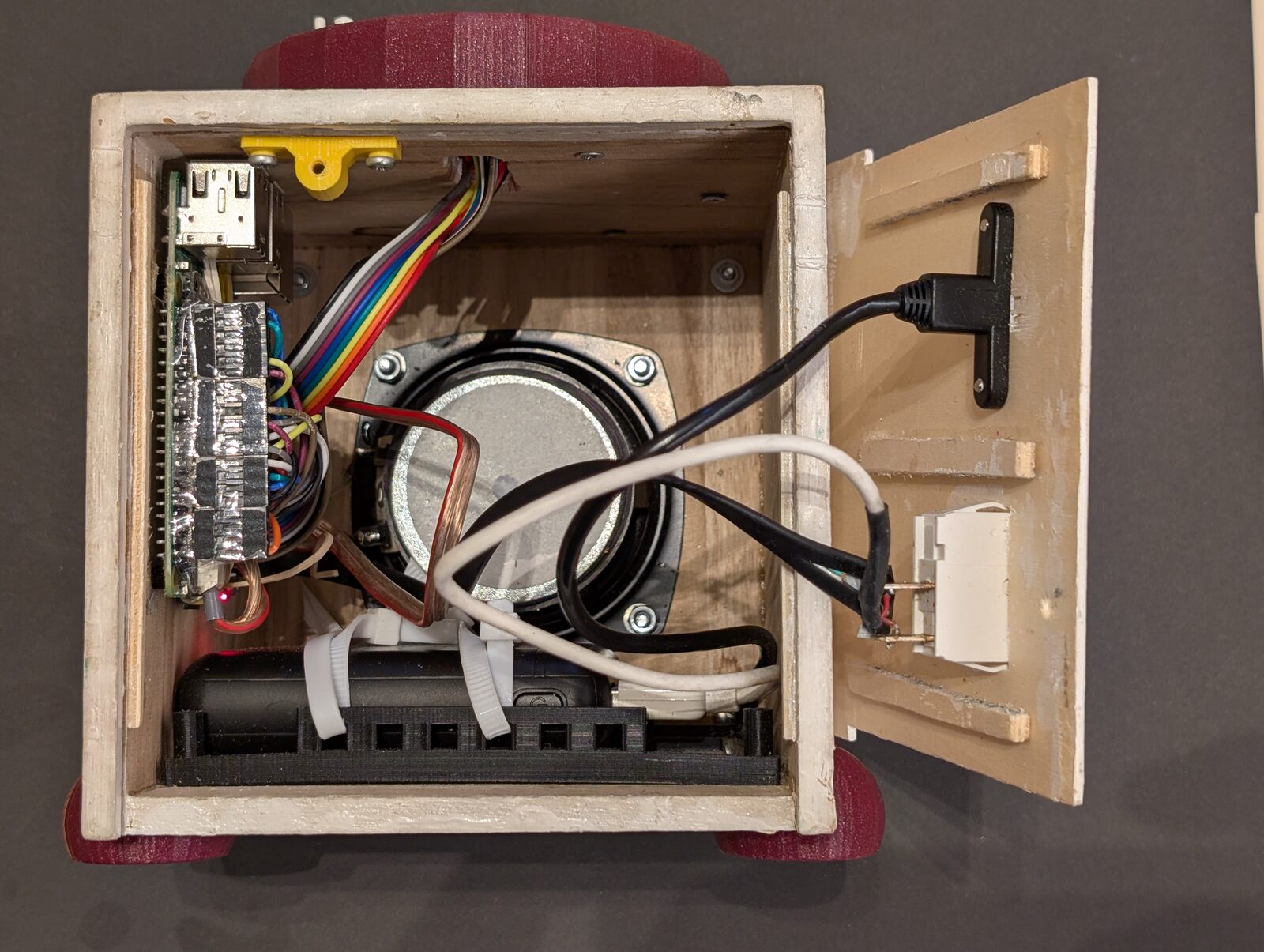
The box open from the back: the Pi 3 with the Audio Amp SHIM, the speaker, the power bank in its frame; on the opened back panel the switch and the USB socket for charging.
1.1 Pins (BCM)
| Part | GPIO | Note |
|---|---|---|
| RFID RC522 | SPI0, CS = 8 (CE0), RST = 26 | RST is driven high by rfid-reader; the IRQ pin is not used |
| Button volume up | 6 | not 18: GPIO 18, 19, 21 are the I2S pins |
| Button volume down | 24 | |
| Button next | 25 | |
| Button prev | 23 | |
| LED red / green / blue | 22 / 27 / 17 | red is inverted (on = low); green and blue on = high |
| Audio Amp SHIM (I2S) | 18, 19, 21 | BCLK, LRCLK, DOUT |
- Buttons use the internal pull-up; pressed = low.
- The Audio Amp SHIM has no enable pin on the Pi: it switches its amplifier on only while the I2S clock runs. It has no volume control; the volume is a software control (section 5).
2. Operating system
| System | Raspberry Pi OS Lite, Debian 13 "trixie", 64 bit |
| Python | 3.13: every slot brings its own; the system Python, with an environment made by uv, serves only the repository on a box of the playbook |
| Hostname | tinyjukebox (lower case: no trouble with mDNS and certificate) |
| User | pi; groups gpio, audio, bluetooth; SSH with key only (the playbook, or chosen in the Imager) |
| Locale, time | en_GB.UTF-8, Europe/Vienna, WLAN country AT |
| Partitions | default: bootfs and one root file system over the whole card; no separate data partition |
Who sets what:
| Sets | |
|---|---|
| Raspberry Pi Imager | the image, hostname, user, SSH key, WLAN with its country, time zone |
| Installer | packages, groups, sudoers rules, robustness, config.txt, sound, Bluetooth, the slots and the first version, the service (deployment.md, section 5.1). It checks Debian 13 and aarch64 before it changes anything |
| Playbook | in addition: hostname, time zone and locale from its variables, further WLANs, SSH with key only, the git repository on the box with the tools to build, the config of the box, the users of the vault; it runs the installer and asserts Python ≥ 3.13 for the repository |
3. Firmware: /boot/firmware/config.txt
# BEGIN Tiny Jukebox
[all]
# rfid reader
dtparam=spi=on
# onboard audio off, Audio Amp SHIM
dtparam=audio=off
dtoverlay=hifiberry-dac
gpu_mem=16
disable_splash=1
boot_delay=0
# END Tiny Jukebox
dtparam=audio=onanddtoverlay=vc4-kms-v3dof the default image are commented out. With the vc4 driver HDMI would add sound cards of its own; the box has no display.- Bluetooth must not be disabled (no
dtoverlay=disable-bt). - No
gpio=25=op,dh(found in installers for other Pimoroni audio boards): GPIO 25 is the "next" button. - A change of
config.txtreboots the box. The block replaces the one with the marker "(ansible)" that the playbook wrote before the installer existed, without a reboot.
4. Packages
| Purpose | Packages | By |
|---|---|---|
| Playback | ffmpeg, alsa-utils |
installer |
| Web page (certificate) | openssl |
installer |
| The libraries a slot needs | libasound2 (with alsa-utils), liblgpio1 |
installer |
| Slot scripts | curl, jq, openssl, util-linux (flock) |
installer |
| Albums | rsync |
installer |
| Name in the network | avahi-daemon |
installer |
| Bluetooth | bluez, bluez-alsa-utils, rfkill |
installer |
| Spotify (Soloist plays only into PipeWire or PulseAudio) | pipewire, wireplumber, libatomic1 |
installer |
Build lgpio and pyalsaaudio (no wheels for Python 3.13 on arm64) and rfid-reader in the repository of the box |
swig, python3-dev, build-essential, liblgpio-dev, libasound2-dev |
playbook |
Code, uv |
git, curl |
playbook |
uvis installed with the script of astral.sh into~pi/.local/bin.- Built from source on the box: bcm2835 and
rfid-reader(section 7). A slot brings its own Python, its dependencies and itsrfid-readerready-made; of the system it needs only the librarieslibasound2andliblgpio1, which the installer installs. - Installed, Debian switches on the user services of
pipewireandwireplumberfor every user: in an SSH session ofpiany program that looks for a sound server would start them with their own setup, which takes the sound card and Bluetooth. The installer masks them (systemctl --global mask pipewire.socket pipewire.service wireplumber.service pipewire-pulse.socket pipewire-pulse.service); the box starts its own instance for Spotify (section 5). A slot does not demand these packages: without them albums and stations play, and a Spotify tag ends as "cannot be played". - Spotify Soloist itself is not a package: the box fetches it from Spotify (architecture.md, section 4.1).
- Cutting card pictures out of a presentation needs LibreOffice and
poppler-utils; that is better done on the PC than on the box.
5. Audio
/etc/asound.conf (template: deploy/config/asound.conf) routes the default
output through a software volume control Softmaster to the DAC:
pcm.!default {
    type plug
    slave.pcm "softvoldevice"
}
ctl.!default {
    type hw
    card sndrpihifiberry
}
pcm.softvoldevice {
    type            softvol
    slave.pcm       "plughw:sndrpihifiberry"
    control.name    "Softmaster"
    control.card    sndrpihifiberry
}
- The card is addressed by its name, not by its number.
- The control
Softmasterexists only after the device has been opened once, and the device only after the reboot forconfig.txt.tinyjukebox-setup.service, which the installer installs, runs before the service on every start and, while the control is missing, plays one second of silence (aplay -q -d 1 -f cd /dev/zero) and saves the state withalsactl store; then it does nothing any more. tinyjukebox.yaml:mixer-control: Softmaster,default-volume: 50,max-volume: 82,volume-step: 5.- Spotify: while an entry plays (or the box is a Spotify speaker), the box runs
pipewireandwireplumberaspiwith a setup of its own in/srv/tinyjukebox/spotify/sound: no sound card, no Bluetooth, one sink that writes into a named pipe. The box reads the pipe and plays it withaplaylike every other sound, soSoftmaster, the limits and BlueALSA apply (architecture.md, section 4.1).
6. File system layout
/srv/tinyjukebox/                      owner pi
├── slots/           a/, b/, fallback/, next/: the versions of the box software (library.md, section 6.1)
├── current          link to the active slot
├── state/           which version runs and why; written by the slot scripts only
├── slot.conf        values of this box for the slot scripts
├── release.pub      public key that every slot archive is verified with
├── identity/        id and key of the box, address and certificate of the library (mode 700)
├── sync/            what the library delivered, own changes it has not confirmed, journal (library.md, section 4.2)
├── spotify/         key, player (bin/soloist), login (data/), cache and sound of Spotify - never synchronized, no backup
├── tinyjukebox/     git repository with the code (pushed from the PC), .venv/
├── config/          tinyjukebox.yaml
├── scripts/         backup_json.sh
├── cpp/             bcm2835-1.77/, RPi-MFRC522/ (sources for rfid-reader)
├── albums/          one folder per album: MP3 files and playlist.m3u
├── backups/         the backups that a box without a library makes by a schedule (operations.md, section 10.2)
├── json/            tags.json, targets.json, activity.json (+ backups *.json_), targets-last-id.json,
│                    volume.json, backups.json (the schedules of the backups), images/ (covers of albums,
│                    stations and entries of Spotify)
├── ssl/             tinyjukebox.crt, tinyjukebox.key, users.yaml
└── log/             tinyjukebox.log (rotated: 4 × 1 MB)

/usr/local/lib/tinyjukebox/         the slot scripts: tinyjukebox-slot, tinyjukebox-start, tinyjukebox-functions;
                                    tinyjukebox-setup (the setup after the reboot); rfid-reader, the launcher of the
                                    program of the active slot, with release.pub and rfid-reader.trusted (section 7)
/usr/local/bin/                     links: tinyjukebox-slot and tinyjukebox-start to the scripts, rfid-reader to the
                                    launcher; tinyjukebox, tinyjukebox-users, tinyjukebox-import-cards,
                                    tinyjukebox-migrate-01 and tinyjukebox-fill-library to /srv/tinyjukebox/current/bin
/var/lib/tinyjukebox-rfid/          rfid-reader as the launcher checked it (root only)
/run/tinyjukebox-rfid/              where the launcher checks a program (root only, in memory)
/usr/local/lib/libbcm2835.a
/etc/asound.conf
/etc/sudoers.d/tinyjukebox-rfid, tinyjukebox-restart, tinyjukebox-trigger, tinyjukebox-avahi
/etc/systemd/system/tinyjukebox.service, tinyjukebox-setup.service
/etc/systemd/user/pipewire*, wireplumber.service   masked (links to /dev/null)
/var/log/tinyjukebox-install.log    what the installer did
/etc/systemd/system/bluealsa.service.d/override.conf
/etc/systemd/journald.conf.d/tinyjukebox.conf
/etc/sysctl.d/90-tinyjukebox.conf
/etc/ssh/sshd_config.d/00-tinyjukebox.conf
- The software that runs is the one of the active slot. The repository
tinyjukebox/(cpp/,scripts/andconfig/tinyjukebox.yamltoo) exists on a box of the playbook only, which takes the config and the sources ofrfid-readerfrom it (deployment.md, section 1); a box of the installer has none of them – itsconfig/is empty, and it runs with the config of its slot. - A box without slots has no
slots/,current,state/,slot.confandrelease.pub, and no launcher. It runs the code of the repository: the commands in/usr/local/binlink totinyjukebox/.venv/bin,rfid-readeris a file there, and every start with changed data adds a folderjson/backup/<time stamp>/. identity/andsync/exist as soon as a box works with a library, with or without slots.
7. RFID reader
| Part | Source | Target |
|---|---|---|
| bcm2835 1.77 | airspayce.com, SHA-256 pinned in the playbook | /usr/local/lib/libbcm2835.a |
| RPi-MFRC522 | GitHub tgd1975/RPi-MFRC522, tag 1.4.5-tgd.1 |
/srv/tinyjukebox/cpp/RPi-MFRC522 (sources only) |
rfid-reader |
cpp/rfid-reader/ of this repository, built with the slot of a release |
bin/rfid-reader of every slot; /usr/local/bin/rfid-reader is a link to the launcher, which starts the one of the active slot |
| launcher | deploy/install/rfid-reader-launcher, written by the installer with its paths |
/usr/local/lib/tinyjukebox/rfid-reader, with release.pub and rfid-reader.trusted next to it – all of root |
| sudoers rule | pi ALL=(root) NOPASSWD: /usr/local/bin/rfid-reader |
/etc/sudoers.d/tinyjukebox-rfid (mode 440, by the installer) |
The program and the reasons for its design: rfid-reader.md. bcm2835 and the fork are on the box
so that rfid-reader can be built and tried there; a box without slots installs that build as
/usr/local/bin/rfid-reader.
The launcher. rfid-reader runs as root, and everything in the slots belongs to pi. A rule for the program of
a slot would let pi – and everything that runs as pi: the application, tinyjukebox-slot, a version that went
wrong – put any program there and run it as root. The rule therefore allows the link to a launcher of root, a small
shell script. On every start of the reader it
- copies
bin/rfid-readerof the slot thatcurrentpoints to into/run/tinyjukebox-rfid– a folder of root, in memory; never through a link, and less than 8 MB. What it checks and starts is the copy, whichpicannot change; - starts the copy only if the box trusts it:
- its SHA-256 is in
rfid-reader.trusted, which the installer writes from therfid-readerof every slot that is on the box when it runs – versions up to 0.44 have no signature, or - the slot brings
SHA256SUMS.sig(library.md, section 6.14), the signature of itsSHA256SUMSby the key of the releases holds – checked with the copy ofrelease.pubnext to the launcher, because the one in/srv/tinyjukeboxlies in a folder ofpi– andSHA256SUMSnames exactly this program; - puts it into
/var/lib/tinyjukebox-rfid– written only when it is another program, because/runmay be mountednoexec– and starts it there with the arguments of the driver.
Otherwise it ends with status 2, and the log says why: RFID - rfid-reader: rfid-reader: not started - …. The paths
are written into the launcher by the installer: sudo resets the environment, and no variable is trusted.
currentpoints to another folder: the launcher only ever starts a program that the release signed or the installer listed – an older one at most.- A version up to 0.44 reads tags only if it was on the box when the installer ran last. One installed later – by hand, from the archive of the library – reads none until the installer runs again; its start check fails, and the box goes back to the version before.
- A program built on the box and put into a slot is trusted when the installer runs again – the playbook runs it (deployment.md, section 6).
- Until the installer runs, a box that updated itself to a version with the launcher still has the link of
before to the program of the active slot: the launcher comes with the installer, not with a version
(
SETUP_LEVELstays 1).
The user pi needs a password for sudo. Besides rfid-reader the box runs three things as root, each allowed by a
rule of its own in /etc/sudoers.d/ for exactly these commands:
| Rule | Allows | For |
|---|---|---|
tinyjukebox-restart |
systemctl restart tinyjukebox |
the slot scripts after a switch (library.md, section 6.7) |
tinyjukebox-trigger |
rm -f of the four trigger files and tee of tinyjukebox-ergebnis.txt on the boot partition |
the start script (library.md, section 6.9) |
tinyjukebox-avahi |
systemctl stop and start of avahi-daemon.socket avahi-daemon.service |
"Connect" of Spotify (architecture.md, section 4.1) |
8. Bluetooth
bluetooth.serviceandbluealsa.serviceare enabled;bluealsa-aplay.serviceis disabled (the box is the sender).- BlueALSA runs with
-S -p a2dp-source -p hfp-ag --a2dp-volume --a2dp-force-audio-cd(override ofbluealsa.service, variablebluetooth_bluealsa_args). Reasons per option: drivers.md, section 5.1. - The adapter must not be blocked by
rfkill(on a fresh card it is): the installer runsrfkill unblock bluetooth;systemd-rfkillkeeps the state over a reboot. pineeds the groupsbluetooth(BlueZ over D-Bus) andaudio(BlueALSA over D-Bus).
Without these services the box works without a headset; the driver logs Bluetooth - not available once and tries
again every 30 s.
9. Network and access
| WLAN | NetworkManager; the first network from the Raspberry Pi Imager, further ones from the vault of the playbook |
| Name | tinyjukebox.local via avahi-daemon |
| SSH | key only (PasswordAuthentication no, KbdInteractiveAuthentication no) – set by the playbook; the installer leaves SSH as the Imager set it |
| Web page | https://tinyjukebox.local/ on port 443, self-signed certificate |
| Open ports | 22 and 443; no firewall |
| File shares | none: albums come through the web page or with rsync |
- The service runs as
piand getsCAP_NET_BIND_SERVICEfor port 443. - The certificate is created on the first start. That should happen with WLAN, otherwise its validity starts at a wrong time (no RTC).
- New versions reach the box through the library in the home network, which the box asks; nothing connects to the box for that (library.md, section 4.14). A box without a library asks GitHub for the newest release itself (library.md, section 6.16).
10. Service
deploy/slot/tinyjukebox.service, installed as
/etc/systemd/system/tinyjukebox.service:
| Setting | Reason |
|---|---|
User=pi, Type=simple, WorkingDirectory=/srv/tinyjukebox |
lgpio creates its .lgd-nfy* files in the working directory, which must be writable |
ExecStart=/usr/local/bin/tinyjukebox-start |
the start script selects the slot, starts current/bin/tinyjukebox (the application with -c /srv/tinyjukebox/config/tinyjukebox.yaml if that file exists, otherwise with the config of the slot, and --no_gui: no interactive console under systemd) as its child and watches a version that is on probation (library.md, section 6.11) |
KillMode=mixed |
the stop signal goes to the start script only, which passes it on and waits; systemd ends what is left after that (a player, rfid-reader) |
After=sound.target bluetooth.service bluealsa.service |
order only; without the Bluetooth services the box runs without headset |
no network-online.target |
the box plays without WLAN, and the web server listens on 0.0.0.0 |
Restart=on-failure, RestartSec=2, RestartSteps=4, RestartMaxDelaySec=30 |
first restart after 2 s, each further one later, at most every 30 s (needs systemd ≥ 254). A version that fails its health check makes the start script end with an error, and the restart starts the version before |
StartLimitIntervalSec=0 |
never give up: nobody is there to start the box by hand |
AmbientCapabilities=CAP_NET_BIND_SERVICE |
port 443 without root |
The restart counter grows only through automatic restarts; systemctl restart tinyjukebox or a reboot reset it.
A box without slots has deploy/scripts/tinyjukebox.service instead. It
differs in three lines: ExecStart is the application itself (tinyjukebox/.venv/bin/tinyjukebox -c … --no_gui), there
is no KillMode=mixed, and ExecStartPre=-… backup_json.sh copies the JSON files to json/backup/<time stamp>/
before every start – only if they changed since the last copy, and with -, because a failed backup must not keep
the box from starting.
11. Robustness
The box is switched off by cutting the power. The setup is built around that:
| Measure | Where |
|---|---|
tinyjukebox writes its JSON files atomically with fsync and keeps a backup of each |
architecture.md, section 6 |
Journal in RAM (Storage=volatile) |
/etc/systemd/journald.conf.d/tinyjukebox.conf |
What is not written with fsync (the log file) is on the card after at most about 6 s, not 35 s (vm.dirty_expire_centisecs = 500, vm.dirty_writeback_centisecs = 100); the JSON files, the outbox and the journal for the library are written with fsync |
/etc/sysctl.d/90-tinyjukebox.conf (installer) |
Root file system with noatime |
/etc/fstab |
log-level: INFO, rotated log (4 × 1 MB) |
tinyjukebox.yaml |
| A new version of the box software is tried on a start and left again within seconds if it fails; unpacking and switching survive a power cut | start script and tinyjukebox-slot (library.md, sections 6.3 to 6.5) |
The notes of the slot scripts in state/ are written to a new file and renamed, those of a switch synced; an empty or damaged note counts as none. config.txt on the FAT partition is replaced the same way |
slot scripts (library.md, section 6.1), installer |
| A damaged or unknown entry, a damaged line of the journal or a damaged file costs that piece, not the start of the box | library.md, sections 4.21 and 7 |
| If neither application slot can run, recovery mode installs a version instead of restarting an application again and again | start script (library.md, section 6.10) |
| What a box needs to be rebuilt is in the library | library.md, section 1 |
| Without slots: JSON backup before a start only if something changed | backup_json.sh – a box in a restart loop must not fill the card |
No automatic updates of the operating system: apt-daily.timer, apt-daily-upgrade.timer, man-db.timer disabled |
installer (--disable; the playbook passes base_disabled_timers) |
Services that only slow the start down are disabled: NetworkManager-wait-online, ModemManager, triggerhappy, keyboard-setup, console-setup |
installer (--disable; the playbook passes base_disabled_services) |
Consequences of the volatile journal: after a reboot the journal of the previous run is gone. The log file
/srv/tinyjukebox/log/tinyjukebox.log is the persistent record.
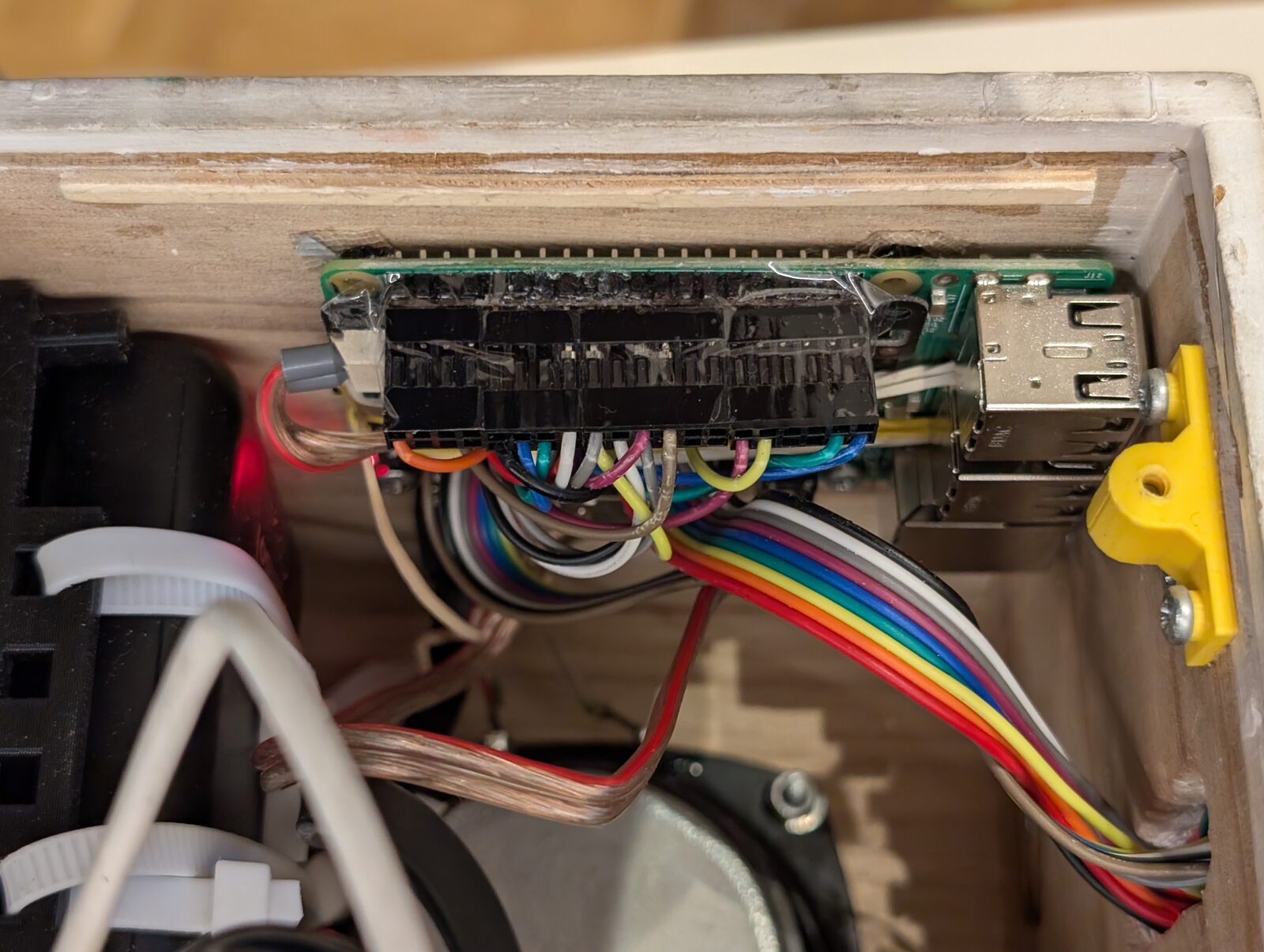
In the hardware, the connectors on the pins of the Pi are secured, so that they cannot work loose:
12. Decisions
| Question | Decision | Reason |
|---|---|---|
| Computer | the Raspberry Pi 3 Model B stays | – |
| 32 or 64 bit | 64 bit | – |
| Processes | one systemd service | no broker and no further services; nothing between processes to keep consistent; systemd restarts it |
| RFID | C++ program rfid-reader |
reliable presence detection (rfid-reader.md) |
| Bluetooth audio | BlueZ + BlueALSA | works without a desktop session; the player keeps using aplay |
| File share (Samba) | none | albums come through the web page or rsync. If that proves insufficient, Samba returns as a role of its own (roadmap.md) |
| Positions of the previous box | not carried over | every album started from the beginning on the new box |
| Updates of the operating system | by hand only (apt full-upgrade); neither installer nor playbook upgrades the system |
no automatisms on a box that plays |
| Updates of the box software | the box fetches released versions from the library – without a library from GitHub –, tries a new one on its next start and goes back if it fails | no PC is needed, any number of boxes; never while the box plays (library.md, section 6) |
| Repository on the box | the PC pushes master into a git repository on the box |
the config and the sources of rfid-reader come from it; fixes can be made and tried on the box |
| System setup | the installer on a fresh image – one line, or run by the playbook | the setup is reproducible; the box is not a one-of-a-kind system; a box needs no PC |
13. Origin
Until October 2026 the box ran version 0.1 of the software on Raspbian 9 (32 bit, Python 3.5): four processes
(mosquitto, rfid-2-mqtt, tinyjukebox, volumecontrol.py) in screen sessions, talking over MQTT. What matters today:
- The new box was set up on a new SD card, not upgraded in place: the old system had a 43 MB boot partition and a 4 GB root partition, could not become 64 bit, and four release upgrades would not have produced a reproducible system. The old card was left unchanged and is the fallback: with it the box plays as before.
- Carried over: the albums,
tags.json(unchanged, same UID format) andalbums.json(converted totargets.jsonwithtinyjukebox-migrate-01). Positions were not carried over. - Kept on purpose: the read loop of the RFID reader, the pins, the volume levels (50 % / 82 %), the button behaviour (hold "prev" 1 s: album from the beginning; hold a volume button: 1 % every 0.2 s; "prev" within the first 10 s: previous track), no pause between tracks.
tinyjukebox/coreandtinyjukebox/devicesdescend from the former packages pelops-core and pelops-devices.