
edakit


Circuit design as code. edakit takes a circuit from an idea to a prototype on a perfboard or a board ready to order. It is a plugin for Claude Code and a command line, and everything it works on is text in your repository. In today's words, it specializes an agent harness for circuit design. The documentation: https://tgd1975.github.io/edakit/.
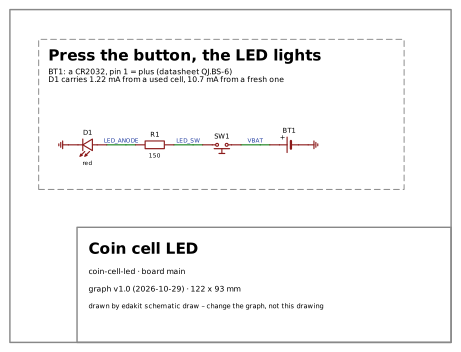
The circuit, drawn by edakit schematic draw |
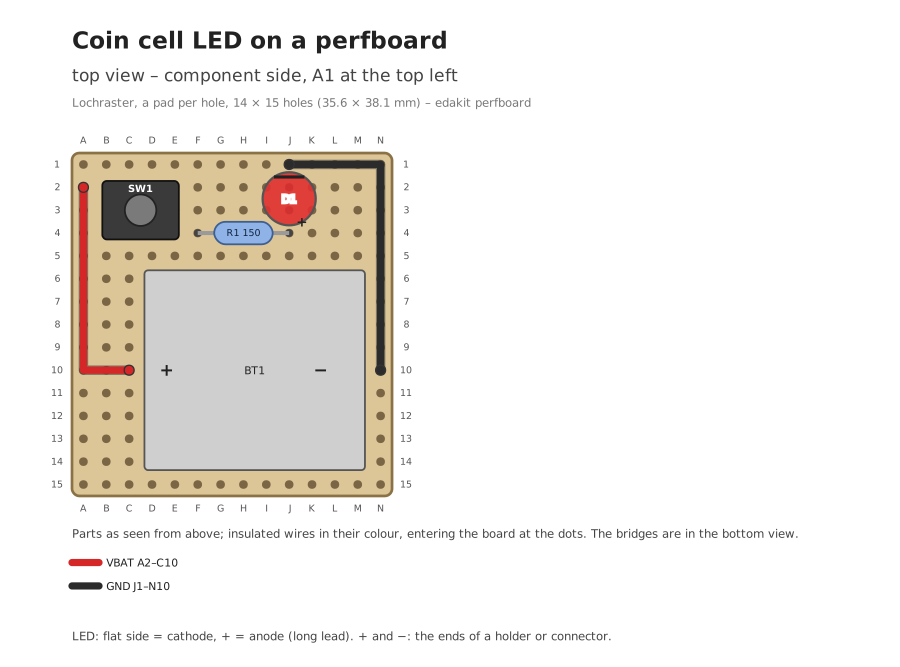
A prototype, drawn by edakit perfboard |
The board, from its Gerber files |
|---|---|---|
 |
 |
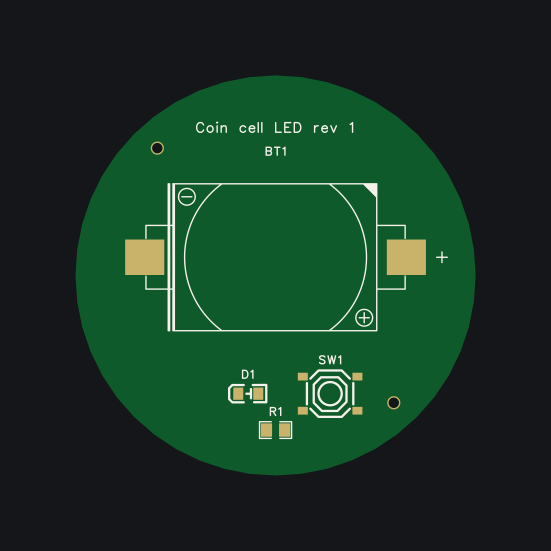 |
The walkthrough's example: a coin cell, a button and a red LED, drawn in EasyEDA Pro – every file of it is text in examples/coin-cell-led, its prototype on a perfboard in variants/perfboard. The same on KiCad: a 555 blinker in examples/blinker-555, with its walkthrough.
Try it in two minutes
In a clone of this repository, without the plugin and without an EDA program:
cd examples/coin-cell-led
uvx --from git+https://github.com/tgd1975/edakit edakit check
It checks the walkthrough's circuit in a fraction of a second and shows a finding that was accepted, with its reason. The quickstart goes on from there: a finding explained, the simulation, the drawn schematic.
- Makers. A checked circuit and its drawing, a prototype on a perfboard, or a board from it: start with the quickstart, then follow the steps.
- Engineers. A rule of your own for edakit's checks: adding a rule.
- Developers. Work on edakit itself: working on edakit.
What it does
You bring the idea, what the board must do, and the decisions on money, purpose and looks. Claude and edakit bring the rest: the parts with their datasheets, the values, the rules, the simulation, the schematic and the PCB in EasyEDA Pro or KiCad, and the manufacturing files. They take the order up to the cart at JLCPCB, PCBWay, Eurocircuits or AISLER. Each maker's quote comes with its price, the parts it has in stock and its lead time, checked by edakit. You order, pay and hold the boards.
A board for my desk: a coin cell, a push button and an LED. Press the button and the LED lights.
A new project: first the setup, in three forms.
PATH.reverse: a CR2032 put in upside down reaches R1 and D1. Protect against it?
- No protection (recommended): D1 blocks, 3.2 V against its rated 5 V.
- A Schottky diode in series: it costs 0.3 V, the margin a used cell needs.
No protection
The board's size and shape? And what must stay where a person touches or looks?
Round, please.
/edakit:cart: every field set and read back, the quote checked against the estimate. Stopped at the cart.Your part in the whole session: 6 messages typed, 21 answers in 8 forms, 5 things done outside the chat. The whole session, from the first sentence to the cart.
The walkthrough shows it on a small board: 14 steps, six of them yours, seven decisions. Every step is checked by rules and reviewers, but that is no guarantee. The regulatory review is support, not legal advice.
At least that is the vision, and we are close. How it works says what has run live, what has not, and where it goes next.
What it needs. Claude Code; uv and ngspice; for a board EasyEDA Pro desktop with Node 24, the default, or KiCad 10 (which one). Tested on Linux; Windows and macOS are untested. An account at the maker you order from.
What it costs. The checks, the simulation and the drawings run offline. Claude's part is paid in tokens: six typical tasks of the evals cost 0.55 USD together with Sonnet 5.5 and 1.48 USD with Opus 5.5 (evals). The board itself is quoted by each maker side by side.
What it is not. No editor of its own: it draws in EasyEDA Pro or KiCad. Two copper layers. The simulation is DC operating points with a few transient and AC runs.
Install
In Claude Code in the terminal:
/plugin marketplace add tgd1975/edakit
/plugin install edakit@edakit
In VS Code, and to update:
handbook 2.3. Without Claude Code:
uvx --from git+https://github.com/tgd1975/edakit edakit <command>. The rest of the tool chain is in
handbook 2. Which version runs, and what a new one changes for a
project: How it works, "Versions".
Read on
- How it works – the steps, who does what, the words, the state and the future work.
- Projects – the boards built with edakit, with their schematics and boards.
- The handbook – the guides: the circuit, the board, troubleshooting.
- The rule catalog – every check edakit runs: its rule, why it exists, what to do and its sources.
- The reference – every key and every command.
What it runs, sends, fetches
edakit runs on your machine and collects no usage data. Your design leaves it only where a command below says so.
Programs. The plugin starts these:
- the
edakitcommand line, in a Python environment that uv builds from the plugin'suv.lock(packages from PyPI); - easyeda-mcp-pro 1.11.0, the MCP server for EasyEDA Pro, installed once with npm into
~/.easyeda-mcp-pro/runtime/; it talks to EasyEDA Pro on your machine through the bridge extension you import in the setup; - ngspice, Freerouting (Java), kicad-cli, git and the GitHub CLI
gh, where a command needs them.
Hooks. The plugin has two:
- at the start of a session, in a project with an edakit.toml, it adds the working agreements (handbook 11.4) and
the project's own scripts and agents to the session. It reads files only (
edakit/agreements.py); - before each EasyEDA tool call, it claims EasyEDA for the session, so that two sessions never drive it at once
(
edakit/lock.py, state in~/.local/state/edakit/).
The network. These commands go online:
| Command | Where to | What leaves your machine |
|---|---|---|
edakit route |
github.com: Freerouting's release, once, into ~/.local/share/freerouting/ |
nothing |
edakit part import |
easyeda.com: EasyEDA's public component data | the LCSC number |
edakit part fetch |
LCSC and the datasheet's own site | the LCSC number, the URL |
edakit part search, edakit stock |
jlcpcb.com: the public assembly catalogue and part pages | the search words, the LCSC numbers |
edakit version, /edakit:version |
github.com: the version tags and the newest CHANGELOG.md | nothing |
edakit release publish |
GitHub through gh |
the release files – into your own repository |
/edakit:propose-rule, /edakit:propose-feature |
GitHub through gh |
an issue in tgd1975/edakit with the text you approved |
/edakit:cart |
the maker's website, in your Chrome through Claude in Chrome | the order files and form fields; it stops at the cart and never orders or pays |
The checks, the simulation, the drawings, the routing and the gate run offline.
Your project's files. /edakit:new-project writes, after your OK, besides edakit.toml and hardware/:
.claude/settings.json, which enables the edakit marketplace and plugin for every session in the repository;- a pre-commit hook in
.githooks/fromedakit hook install, which also setsgit config core.hooksPath .githooks; - a CI workflow that runs the same checks on every pull request.
Questions and bugs
A question, a bug or a board you built with edakit: open an issue with its form. edakit is kept by one person with Claude, and answers come as time allows.
Licence
MIT – see LICENSE –, except for pytree's schematic and pictures and for third-party material the tests use. Each folder of tests/open_designs/ names its source, licence and changes in its README:
| Path | Source | Licence |
|---|---|---|
tests/open_designs/guitarml-classic-boost/, guitarml-ts-rat-combo/ |
Keith Bloemer (GuitarML), GuitarPedalPCBs | MIT, notice in the README |
tests/open_designs/corne-cherry-v3-left/ |
foostan, Corne Cherry v3 | MIT, notice in the README |
tests/open_designs/corne-cherry-left/ |
foostan, Corne keyboard v4 | CC BY 4.0 |
tests/open_designs/espurna-h/ |
Xose Pérez (tinkerman.cat), ESPurna-H v0.8 | CC BY-SA 4.0 (the repository says 3.0, the schematic 4.0) |
tests/open_designs/sparkfun-logic-level-converter/ |
SparkFun Electronics, Logic Level Converter | CC BY-SA 3.0 |
tests/open_designs/adafruit-microlipo-usb-c/ |
Limor Fried/Ladyada for Adafruit Industries, Adafruit Micro-Lipo Charger with USB Type C Jack | CC BY-SA 3.0, the text Adafruit asks for in the README |
tests/open_designs/atoomnetmarc-adlsc/ |
atoomnetmarc, ADLSC (a WLED controller) | Apache 2.0, the licence's text in the folder's LICENSE |
tests/open_designs/esp32-devkitc-v4/ |
Espressif Systems, ESP32-DevKitC V4 schematic | none stated – only the circuit's facts are transcribed, not the drawing |
tests/open_designs/whbeers-fuzz-face/ |
whbeers, Random Input (a Fuzz Face) | CC0 1.0 |
docs/projects/pytree/ |
pytree, the programming advent calendar: its schematic and the pictures of the tree | pytree: © pytree, all rights reserved – not under edakit's MIT license |
tests/fixtures/jlcpcb/, easyeda/, datasheets/, makers/ |
short excerpts of the pages and API answers of JLCPCB, LCSC, EasyEDA, AISLER, Eurocircuits and PCBway, with source and date, for the parsers' tests | the sites' own; not under MIT |
This is a reading of the sources' licences, not legal advice.