14 Designing a circuit: rules, hints and building blocks
For you when you design a circuit or want edakit to know more. Chapters 3 to 8 check a circuit; this one covers the step before – from "five LEDs, a servo, USB power" to a graph – and the knowledge the checks are made of. The short way: Design the circuit.
In short. You decide; the work is split into roles, each a skill or an agent in a session of its own, and reviewers that change nothing (roles, 14.1). What edakit knows is data in one catalog: engines with their codes, tables, and domains – profiles of rules per area, suggested by the graph (the catalog, 14.2). A hint is knowledge no program can decide, a note that never blocks (hints, 14.3). A finding no code caught becomes a code, a fact or a domain setting on your word, through the skill add-rule (from a finding to a rule, 14.4). A building block is a checked piece of graph with ports (building blocks, 14.5).
14.1 Roles
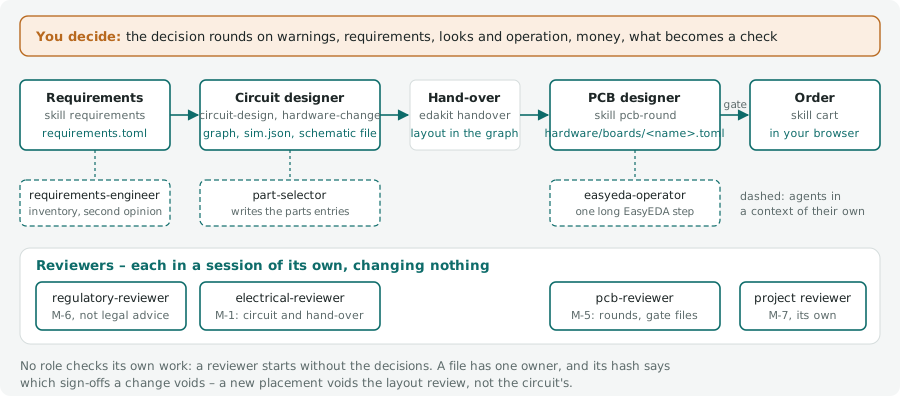
- Project surveyor – the agent
project-surveyorin its own context, for the skillnew-project. For a project that moves to edakit it reads the repository – hardware data, scripts, agents, skills, documents, decisions, hooks – and returns per place candidates with where it found them, a proposal and its reason. It changes nothing; the skill asks you in its interview and writes after your OK (a project, 2.7). - Requirements engineer – a session with the skill
requirements, and the agentrequirements-engineerin its own context. The skill collects with you what those involved state the circuit must do – inputs, not edakit's outputs. It asks back in a decision round until vague words are your numbers, writes drafts into the requirements file and has you approve them; it never writes the graph. The agent reads every document of the project and changes nothing. It returns candidates with who stated them (inferred ones marked), what edakit already checks on every board, contradictions, vague words and requirements without evidence: the first inventory and a second opinion (requirements, 3.6). - Circuit designer – a session with the skills
circuit-designandhardware-change. It reads the requirements file – without one, it asks for the requirements in one decision round –, picks blocks and parts and computes values. It writes the graph with its check settings and the schematic file, works throughedakit checkandedakit sim, draws the schematic and writes the hand-over. - Part selector – the agent
part-selector, in its own context. It finds parts for the circuit designer at the project's distributors (one profile each), compares stock, price, lifecycle and compliance data, recommends one and writes its parts entry. It never touches the graph (finding parts, 4.2). - Electrical reviewer – the agent
electrical-reviewer, in its own session. It reads graph, hand-over, parts, simulation and datasheets, changes nothing and returns numbered findings with probability and cost. It reviews before the first layout, before every hand-over that changes parts or the power path, and as the sign-off M-1. - Regulatory reviewer – the agent
regulatory-reviewer, in its own session. It checks circuit and parts against EU law for the purpose in the graph (RoHS, REACH, radio, batteries, product safety), changes nothing and returns numbered findings with their sources. Its result is the sign-off M-6 (chapter 15) – support, not legal advice. - PCB designer – a session of its own with the skill
pcb-round. It works from the hand-over: EasyEDA schematic, PCB, and in its board filehardware/boards/<name>.tomlplacement plan, routing and silkscreen. It does not change the graph. - EasyEDA operator – the agent
easyeda-operator. It runs one long EasyEDA step for the PCB designer and returns only the result. - PCB reviewer – the agent
pcb-reviewer, in its own session. It reads plan, hand-over, routing and the copper of every layer from the Gerber files, changes nothing and returns numbered findings with probability and cost. It reviews at the end of every layout round that changed placement, routing or pours, and the gate run's files as the sign-off M-5. - Project reviewer – an agent of the project (
[agents.<name>]in edakit.toml; project scripts and agents, 8.6), in its own session. It reviews with the project's own knowledge and changes nothing: in place of the edakit reviewer it replaces (replaces), or for a sign-off of its own (M-7) at its hook point. Its sign-off counts only signed by it. - Order – a session with the skill
cart, in the decider's browser (Claude in Chrome). It fills the maker's form from the job of the release and reads every field, the part matching and the quote back foredakit cart check. It puts the board into the cart and stops; consents, M-2 at the maker, ordering and paying are the decider's (ordering, 8.4). - Decider – you. You answer the decision rounds: warnings, requirements, looks and operation, money, what becomes a check.
No role checks its own work: a second opinion from the session that made the decisions repeats the decisions, and the
reviewer starts without them. With a requirements file each reviewer also judges the requirements whose verify names
its sign-off, and names the ones it found met in the note it signs with (requirements at the gate, 8.7).
The hand-over. Circuit and layout are separate sessions, so what the layout must know is written down – the
PCB designer gets nothing else. It is layout in the graph: parts that are fixed (pressed, looked at), at the edge
(plugged in from outside), next to another part (a current-setting resistor at its pin), the hot loops of switching
regulators, and notes no program checks. The decoupling capacitor of every IC is derived from the graph.
edakit handover shows all of it with the circuit's state and sign-offs; SYNC.plan holds the placement plan (7.4) to
it.
Because the hand-over is part of the graph, it is reviewed and signed with the circuit (M-1). A circuit change the layout needs – another GPIO, another footprint – goes back as a written request in the decision log; the PCB designer does not change the graph. A project without a PCB ends at the hand-over: the drawing is the schematic.
Files. Each role writes its own (the project files, 10.1): the requirements engineer the requirements file, the circuit designer the graph, the simulation config and the schematic file, the part selector the parts database, the PCB designer the board files. A file has one owner, and its hash says which sign-offs a change voids – a new placement voids the layout review, not the circuit's.
14.2 The catalog: engines, codes, data and domains
What edakit knows about circuits is data in one catalog, which the code reads. Five things carry it:
| Thing | Where | Holds |
|---|---|---|
| engines and codes | edakit/catalog/codes.toml |
thirteen engines, each deciding one kind of relation, and their codes: title, rule, why, what to do, severity and grades, sources, the check IDs of before it replaces |
| parts schema | edakit/catalog/kinds.toml |
per kind the limits and values an entry may give, every name with its unit (4.1); edakit part lint holds the entries to it |
| defaults | edakit/catalog/needs.toml, levels.toml, paths.toml |
what a pin or part of a kind requires unless its entry says otherwise (decoupling per power_in, a pull-up per I2C line, a diode per coil, Rd per CC pin), the levels at reset, the parts a supply passes through |
| tables | edakit/catalog/tables/ |
the numbers with their source: EU radio bands, USB, I2C, derating, JLCPCB's capabilities, IPC-2221, the audio band's source models (pickups, piezo discs, electret capsules as their makers state them), the termination and idle bias of RS-485 and CAN buses, the ES1 limit of IEC 62368-1 |
| domains | edakit/domains/ |
which codes are on and how severe, the facts a kind must give, the hints, the reviewers' questions |
Engines and codes
Each engine decides one kind of relation – on the graph, the parts, the simulation, the plan or the files:
| Engine | Decides |
|---|---|
| STRUCT | the graph is well-formed and names what exists |
| SYNC | every artifact equals the graph and the plan |
| LIM | every quantity within its limit |
| LVL | every input defined in every state, no two drivers fight |
| REQ | what a part requires on its pins is present and in range |
| PATH | what a reversed, unfed or misplaced supply reaches |
| SIM | the scenarios run, are complete and reach the states they expect |
| GEO | copper, holes, print, widths and distances on plan and Gerber files |
| PERF | the plan of a hand-wired board on a perfboard makes the graph's nets and can be built |
| FILES | manufacturing files and sheets complete and consistent |
| PARTS | parts entries complete, well-formed, verified, orderable |
| ORDER | the order at the maker is the release: form, parts, quote, read, files, finish, review, confirm; the supplier's cart is the basket |
| DOCS | documents and requirements quote the design |
| HINT | patterns that need judgement, as notes |
LIM computes nothing itself. Producers give it quantities – the declared ranges of the graph times a derating factor
in stage G, the simulated values in stage E –, and it compares each with the limit of that name in the parts entry
(v_max_v, i_max_a, p_max_w, tj_max_c), derated where the table says so. A new limit in a parts entry is checked
without new code.
Codes. A finding's code is ENGINE.relation – LIM.v a voltage beyond its limit, REQ.missing a part without
what it requires –, so it says what kind of finding it is without a lookup. A finding carries code, stage, place,
text, source and fix, and where it applies a grade and a topic:
- severity –
error(blocksedakit check),warning(the gate wants it accepted in the sign-off file),pending(blocks the release and cannot be accepted: an unverified part, a missing stock snapshot),note. The catalog gives each code its default; the project's profile may set another. - grade – a sub-case with its own severity:
margin(inside the limit, in its margin),unknown(a value missing),stale,unchecked,draft,firmware(the firmware keeps it), or a missing fact (PARTS.fact/lead). A profile sets"LIM.i/margin" = "error"like any code. - topic – the part of a code one domain switches on or one acceptance names:
REQ.missing:cc(USB-C termination),GEO.spacing:paste,SYNC.plan:handover.
edakit rules                 # the engines and their codes, one line each
edakit explain REQ.missing   # rule, why, what to do, severity, sources
edakit explain G-8           # a check ID of before: the codes that replace it (10.7)
The catalog explains the findings. edakit check prints what to do for every failed code below the findings, and the
gate protocol ends with "The rules behind the findings". The handbook's lists of codes (3.3, 5.3, 8.1, 8.4, 14.3) and
the parts schema (4.1) are generated from it with python -m edakit.catalog.handbook --write; a test fails while they
differ. Tests make sure that every code the engines can report has an entry and that the catalog passes its lint:
every code with engine, title, rule, why and fix, every table row with its source.
Accepting
One mechanism for everything a person has seen and answered: accept with a reason, keyed by the code. On the net or
the component it reads "accept": {"LVL.undefined": "floating until the firmware runs, harmless: OE is pulled high"},
on the graph {"HINT.bulk": "C1 1000 µF next to J1 (D-8)"}; a code and a place ("HINT.bulk J2") count for one place
only. A key may name a grade or a topic: LIM.i/margin, GEO.spacing:paste. In the graph an acceptance is part of
the circuit hash and renews M-1. Warnings for the release are accepted in the sign-off file under accept (8.2).
Pending findings cannot be accepted.
Domains and purpose
A domain is a profile of rules per area of electronics, suggested by what the graph has. core is always on:
structure, artifacts, limits and levels of the basic kinds, parts, files, documents. The others:
| Domain | Switches on | Suggested by |
|---|---|---|
usb |
the USB-C termination and its data in both orientations | a USB-C receptacle |
radio |
the e.i.r.p. and the bands of parts that transmit | a part that transmits |
audio |
bridge-tied outputs, the hints of hum and switching noise | a speaker |
guitar |
the instrument input's load and the pedal's supply | an instrument net |
motors |
the hints of motor supplies and heaters | a motor |
power |
the hints of cells, converters and polarity | a battery holder |
cables |
the lines on a lead | a cable |
mains |
no check – spacing and isolation stay unchecked (rules-at-scale.md, decision 7) | a net above the ES1 limits, which LIM.hazardous recognises |
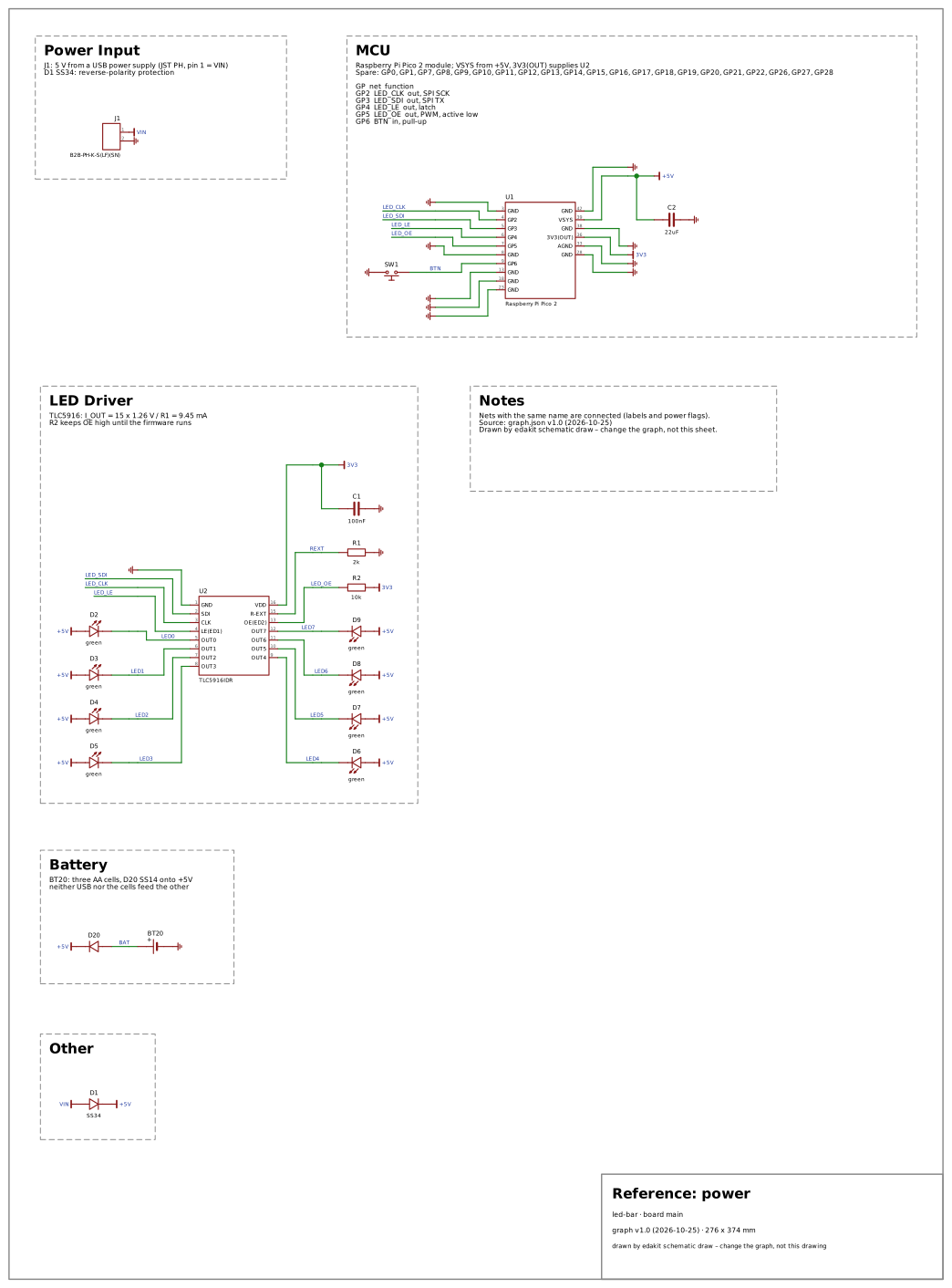
Each domain has such a reference circuit with the faults it must catch, drawn on its page of the catalog. Why each and what a new one must bring: the reference circuits (19.4).
The interview of a new project asks for no domain: there is no graph yet, and the graph decides (skill new-project). A
domain file sets severities (also per purpose: [severity.sale]), switches codes or topics on, and names the facts a
kind must give (a missing one is PARTS.fact), the hints that apply and the questions the reviewers ask. A project
names its domains in edakit.toml:
[project]
domains = ["usb"]        # core is always on; without the key every domain the graph suggests is on
A domain a part suggests that is left out of an explicit list gives one note, STRUCT.domain: no silent gap.
edakit domains shows the domains on, off and suggested, and the reviewers' questions of the domains on. Domain files
live in edakit only.
Purpose. purpose.use of the graph (private, gift, sale) is a dimension of the profile. What the firmware or a
parts entry can settle – a radio band, a radio nobody stated – is a warning for a board that is sold and a note
otherwise (stages, 8.1; chapter 15).
N and R are no engines: N-… and R-… are the needs and requirements of a project's requirements file (3.6), and a protocol names both. The codes on that file are DOCS.ref, DOCS.need, DOCS.evidence and DOCS.draft.
Findings come only from code. A code is reported by an engine with a negative test; Claude does not invent checks at runtime. What Claude knows beyond the catalog goes into a review as a finding with its evidence, or into a proposal (14.4) – not into a finding that looks like a code.
14.3 Hints
Some knowledge has no rule a program could decide – whether a button needs a hardware debounce, for one. These are
hints, the engine HINT: matched by the kinds of parts in the graph or by a pattern, shown by edakit check as
notes, never blocking. The catalog's hints:
| Code | Title | Severity |
|---|---|---|
HINT.datasheet |
notes of the parts entries | note |
HINT.bulk |
bulk capacitor at the power input | note; replaces H-1 |
HINT.gate |
MOSFET gate resistor | note; replaces H-2 |
HINT.debounce |
debounce buttons and switches | note; replaces H-3 |
HINT.inductive |
inductive load off the board | note; replaces H-4 |
HINT.switcher |
switching regulator layout | note; replaces H-5 |
HINT.lithium |
lithium cells need protection | note; replaces H-6 |
HINT.esd |
ESD at external connectors | note; replaces H-7 |
HINT.two_supplies |
two supplies on one net | note; replaces H-8 |
HINT.readback |
read-back of a serial output | note; replaces H-9 |
HINT.motor_supply |
motor supply: bulk capacitor and returned energy | note |
HINT.heater |
a heater needs a second interruption | note |
HINT.audio_ground |
audio: ground loops and shared returns | note |
HINT.class_d |
filterless class-D output on a cable | note |
HINT.audio_switching |
switching in the audio band | note |
HINT.signal_ceramic |
class-2 ceramic in a signal path | note |
HINT.jack_battery |
battery switched by the input jack | note |
HINT.pedal_supply |
a pedal's supply among others | note |
HINT.string_ground |
the player on the amplifier's ground | note |
HINT.jack_supply |
a supply on a jack contact | note |
HINT.relay_load |
relay contacts switching a load off the board | note |
HINT.flicker |
LED flicker from PWM | note |
HINT.boost_enable |
a boost converter switched off by its enable | note |
HINT.usb_budget |
the current a USB port gives | note |
HINT.usb_inrush |
more than 10 µF on USB VBUS | note |
HINT.power_path |
a load on the charging cell | note |
HINT.charge_termination |
a charger's end of charge is not simulated | note |
HINT.protection_timing |
a cell protection's release and delays are not simulated | note |
HINT.pd_negotiation |
a USB PD sink's negotiation is not simulated | note |
HINT.input_polarity |
a power input without a polarity check | note |
HINT.thermal_copper |
thermal resistance needs its copper | note |
HINT.cable_line |
a signal line on a cable | note |
Rule, why, fix and sources of each: edakit explain CODE, or the code on its page of the catalog.
The designer handles each hint and writes down how in the graph (a JSON graph has the same keys,
"accept": {"HINT.bulk": "…"}, 3.1):
[accept]
"HINT.bulk" = "C1 1000 µF next to J1 (D-8)"
"HINT.debounce" = "firmware debounces 20 ms"
edakit check then lists it as accepted, with the reason, and the reviewer checks whether the reason holds.
Notes in the parts database are hints that belong to one part: "hints": [...] for the part and "hint" per pin,
from its datasheet – "ADC2: no analog reads while Wi-Fi is on" on the ESP32's pins of ADC2. edakit check shows them
as HINT.datasheet for the parts in the graph and their connected pins.
14.4 From a finding to a rule
edakit's rules are lessons – a footprint with '+' at the cathode, for one. Each was found once by a person or a review agent and became a code, a fact or a domain setting. The loop is part of the workflow:
- The reviewers mark every finding with the code it falls under – then also why that code did not report it: a bug, or a fact missing in a parts entry. Or they mark it as a candidate: which engine and which data would find this kind of fault again – a fact, a new relation or a domain setting (the kinds, step 5). Findings that need judgement are marked as such.
The classes no code covers fully yet are the reviewers' questions in the domain files ([review] in
edakit/domains/, shown by edakit domains), so every review asks them instead of finding them by chance. Among
them are several sources, back-feed and the switch-over gap, MCU pin functions, supply range and input levels of
the other ICs, read-back edges, junction and touch temperature, and what an off-board module brings. Each question
names the codes that cover part of its class (REQ.function, LIM.backfeed, LIM.range, LVL.threshold, LIM.t,
REQ.missing:cc, HINT.two_supplies, HINT.readback).
2. In the decision round the candidates are one item: make it edakit knowledge? You decide. Nothing is filed anywhere
by itself – whether a finding is knowledge worth keeping is a judgement, not something a program can tell.
3. Yes: a decision in the project's decision log, written so that it can be built later without the conversation –
what the rule would find, the finding with its numbers, the source, edakit: open.
4. Proposal. When you ask for it, the skill propose-rule turns the decision into an issue in the edakit
repository. Its text is fixed (edakit proposal template: kind, rule, why, finding, fix, sources, origin), shown
to you before it goes out – the issue is public – and sealed with edakit proposal seal, whose last line is the
SHA-256 of the text. The decision gets the issue (edakit: #12).
5. Triage. The Action proposals of the edakit repository starts on every proposal of the repository owner and
on their answers. It runs the skill triage-rule in a session of its own (for a feature proposal triage-feature,
11.6). The checks come in a fixed order, and the first that fails decides:
- Who and the format, fixed in the workflow before Claude starts: the proposal's author is the repository
owner, read again from GitHub, and edakit proposal verify passes – every section filled in, the checksum
matches. A body edited by hand fails on purpose. A broken proposal gets its Question from the workflow, with
what verify reports, and costs no Claude run.
- Safe? Claude's first judgement. Rejected, never asked back, is a proposal that would change the pipeline
– one of its paths (below), or how proposals are started, read, judged, built or published –, run or fetch at
check time what edakit does not run today, read credentials or write outside the project, add a hook, skill,
agent or setting that pushes, orders, pays, publishes or grants permissions unasked, weaken a check without a
source that shows the check wrong, or need a new dependency.
- Plausible? New, the sources hold, the gap real at this commit.
- Acceptable? The right kind, general rather than one project's choice, which engine and which data – a fact
before a new relation, a relation only where a program decides it (else a hint) –, graded by the purpose,
testable, one capability, clear enough to build.
The kinds: fact (a row of data: a part fact, a default, a table row), relation (a new code, a hint too),
domain (a severity, a required fact, a reviewer's question), block, retire. A proposal sealed before the codes
says check, hint or part and is read as relation or fact. The result is one of three, as a comment on the
issue: Accepted, Rejected with a reason a person can check, or Question with the alternatives –
everything between accepted and rejected is a question.
6. Build. An accepted proposal is built with the skill add-rule, a skill of the repository in .claude/skills/
and not part of the plugin. A fact becomes a row with its source (a parts entry of the block library, a default, a
table). A relation becomes a code in codes.toml (title, rule, why, fix, severity, sources) and its place in an
engine – a new code starts as a warning. A domain change goes into its domain file. Then come a negative test that
builds the fault into the example and expects the code, a run against real projects to rule out false alarms, and
the generated lists of this handbook (python -m edakit.catalog.handbook --write).
One commit per proposal, all of them in one open pull request from rules/proposals, which the repository owner
merges. The same skill adds blocks and retires codes – also by hand in the repository, without an issue.
7. Back in the project. propose-rule follows the issue: it answers questions with you, and after the merge the
decision gets the code (edakit: REQ.function) or edakit: rejected (#12). From the next plugin update on the
rule runs on every project – every merge into main is a version of its own (the plugin, 2.3).
What no code catches. edakit mutate builds mistakes into a copy of the design one at a time and lists those no
code reports. On the tests' led-bar, 24 of 45 are caught without the simulation and 43 with --sim. The two left are
R-EXT and the OE pull-up a hundred times larger: the LEDs dim with R-EXT, and nothing says how bright they should be
(a load's expect would). The list is for reading, not a list of faults; a class of mistakes it shows again and again
is a candidate. The reference circuits per domain (tests/reference.py) carry the seeded faults each domain must catch
with exactly its codes (the reference circuits, 19.4).
The proposals Action
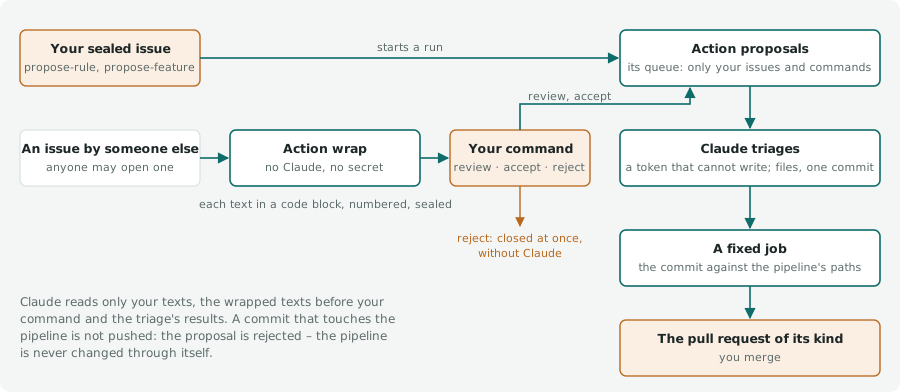
Claude only reads. The triage runs with a token that cannot write and follows main's copies of the skills rather than
the branch's. It gets the proposal's text, the repository owner's comments and the triage's earlier results – of what
anyone else wrote only what the Action wrap wrapped before a command of the repository owner (below). It commits an
accepted build on the proposals branch and writes its result as files: the result, the comment, the line for the pull
request. A fixed job publishes it:
- The commit – at most one, its subject ending in
(#N)– is checked against the pipeline's paths:.github/,.claude/,CLAUDE.md,edakit/proposal.py,tests/test_proposal.py,skills/propose-rule/,skills/propose-feature/,pyproject.toml,uv.lock. A commit that touches one is not pushed, and the proposal is rejected with the paths: the pipeline is never changed through itself. The list lives inedakit/proposal.py. Any other fault of the commit pushes and posts nothing; the run shows red and the proposal waits. - The pull request is asked for again right before the push; merged meanwhile, the commit goes onto main into a new one.
- Then come the push, the line in the pull request, the comment, the labels, a rejected issue closed, and the pull request's tests started – what the workflow's token pushes starts no workflow by itself.
- No result posts nothing: the run shows red, and the proposal stays waiting. The step Why Claude stopped shows
Claude's last message after every run. A token that no longer holds shows there as
401 Invalid bearer token; with a new one,gh workflow run proposals.ymltriages what is waiting.
The queue. The issue that started a run goes first, unless a triage answered it since its event. Then comes every proposal still waiting – without a result, or with a question the repository owner answered since, in a comment or by sealing it again; on an issue by someone else, a command of the repository owner with no result after it.
At most eight go per run, one after another, because accepted proposals share their branch; the rest waits for the next run. So proposals filed at the same time and answers given while a run waits are not lost when GitHub cancels their waiting runs. An event that triages nothing – a comment on a proposal already built – waits apart and cancels none.
Who may propose. Anyone may open an issue in the edakit repository, and one from outside is welcome; Claude acts only on the repository owner's word. Their own sealed issues start the Action by themselves, an issue by someone else waits for their command (below). GitHub's author field says who wrote an issue or a comment; the checksum adds that the text is the one that was sealed.
Setup. The Action runs with the workflow's own token – the Claude GitHub app is not needed. It needs one of the
secrets CLAUDE_CODE_OAUTH_TOKEN or ANTHROPIC_API_KEY (claude setup-token, gh secret set
CLAUDE_CODE_OAUTH_TOKEN) and the repository setting "Allow GitHub Actions to create and approve pull requests"
(Settings, Actions, General). Its comments and pull requests come from github-actions[bot].
Before a merge. From the Action only public projects can be cloned for the run against real projects; the pull
request names what could not be run, and that is run by hand before merging. A conflict in a generated file –
the pages in docs/catalog/, the handbook's generated sections – is not merged by hand: the file is written again by its
script (docs/catalog/build.py, python -m edakit.catalog.handbook --write). A main that changed a workflow file is
brought into the proposals branch by a session – the workflow's token may not push a workflow change.
Issues by others
On an issue someone else opened, the Action wrap wraps every text the repository owner did not write – the issue's
title and body, every comment. It is a fixed Python step without Claude and without a secret, the one workflow anyone
can start.
Each text becomes a comment of the workflow: the text as plain text in a code block, so that no link, image or mention in it renders, numbered within the issue (Wrapped 1, 2, …), its last line the seal – the SHA-256 of the text. An edited text is wrapped again under a new number that names the one it replaces. The first wrapped text lists the commands; the repository owner answers with a comment that starts with one of them:
| Command | What happens |
|---|---|
review |
the skill triage-request judges the request – Safe? first, then plausible and acceptable – and answers Review: its kind, what accept would build, numbered questions for the author or the repository owner, and a recommendation; nothing is built |
accept |
triage-request builds it with add-rule or add-feature into the pull request of its kind: Accepted – or Rejected when Safe? fails, Question when building shows what is unclear |
reject |
the Action wrap closes the issue as not planned and labels it rejected, at once and without Claude |
The rest of the comment is the repository owner's note to Claude, for reject the reason. Claude reads the wrapped
texts that came before the command, the repository owner's comments and the triage's results – never a text by
someone else as its author wrote it; a wrapped text whose seal no longer matches is left out. A later text by someone
else, the author's answer to a question too, is wrapped and waits for the next command. Any other comment of the
repository owner starts nothing. The workflow labels an issue the repository owner started adopted.
The repository owner can also hand such an issue over with a sealed proposal as a comment, written from the issue with
propose-rule or propose-feature and posted with gh issue comment N --body-file body.md. The triage then reads
their newest sealed comment as the proposal, their comments and the triage's results, as on their own issues.
14.5 Building blocks
A block is a piece of graph with checked parts: components with LCSC numbers, nets, and ports – the nets that connect to the rest of the circuit.
edakit block list
edakit block show usb-c-sink
edakit block add usb-c-sink --as USB --connect vbus=+5V --dry-run
edakit block add led --as STATUS --connect in=LED_STATUS
| Block | Content |
|---|---|
led |
series resistor and LED from a signal to ground |
button |
push button to ground with a 10 kΩ pull-up |
i2c-pullups |
4.7 kΩ on SDA and SCL, marks both nets as I2C |
npn-switch |
S8050 low-side switch with base and base-emitter resistor and a flyback diode |
power-input-jst |
JST PH input, SS34 against reverse polarity, 22 µF |
power-or-pmos |
two supplies ORed onto one rail: USB through an SS34, cells or a second input through two AO3401A back-to-back that USB switches off – neither supply is fed backwards (HINT.two_supplies) |
reverse-pmos |
AO3401A reverse-polarity protection with its gate resistor |
usb-c-sink |
USB-C power input with 5.1 kΩ per CC pin and a polyfuse |
addressable-led-input |
74AHCT1G125 level shift from 3.3 V to a 5 V pixel's data input, 330 Ω series resistor, 1000 µF at the strip's supply (BL-1) |
nmos-switch |
AO3400A low-side switch, specified at 2.5 V gate drive, with gate resistor, pull-down and a flyback diode (BL-2) |
pmos-high-side |
AO3401A high-side switch with an S8050 level shift (BL-3) |
lipo-charger |
MCP73831 charger, DW01A and FS8205A cell protection, load sharing after Microchip AN1149 (BL-4) |
ldo-3v3 |
RT9080 3.3 V LDO, 600 mA and 2 µA quiescent, for an ESP32 (BL-5) |
battery-sense |
battery voltage through a 1:2 divider a P-MOSFET switches on, hold capacitor at the ADC (BL-6) |
esp32-wroom-32e |
ESP32-WROOM-32E with EN 10 kΩ and 1 µF, BOOT button, the auto-program circuit and a CH340C (BL-7) |
usb-c-data |
USB-C with USB 2.0 data (both rows joined), USBLC6-2SC6, 5.1 kΩ per CC pin, polyfuse (BL-8) |
i2c-level-shift |
two BSS138 with pull-ups on both sides, 100 kHz (BL-9) |
rs485 |
MAX3485 at 3.3 V with switchable 120 Ω termination, idle bias and DE pull-down (BL-10) |
midi |
MIDI in through a 6N138 and MIDI out for a 3.3 V MCU on 5-pin DIN (BL-11) |
cable-input |
an input on a long lead: pull-up, series resistor and capacitor, TVS at the connector (BL-12) |
servo-connector |
hobby servo header with a bulk capacitor (BL-13) |
dc-motor-drv8833 |
DRV8833 for two DC motors with its VM, VCP and VINT capacitors (BL-14) |
eurorack-power |
keyed 10-pin Eurorack header, a series Schottky per rail, 10 µF per rail (BL-15) |
instrument-buffer |
OPA991 follower with a 1.1 MΩ input, RF filter at the jack, 100 Ω output, an AC expectation (BL-16) |
pedal-power |
9 V centre-negative jack, Schottky, 100 Ω and 100 µF, a 4.5 V reference (BL-17) |
relay-bypass |
true bypass with a gold-contact signal relay, transistor coil drive and a photo-MOS mute (BL-18) |
What add writes
add gives designators the next free numbers (R1 of the block becomes R7) and internal nets the instance's name
(STATUS_ANODE). Each port joins the net given with --connect – or a new net, if the block knows its voltage range
–, and gnd joins the project's ground. Missing parts entries are copied from the block library; an existing entry
must have the same pins.
A JSON graph keeps its indentation. A TOML graph (graph in edakit.toml, 10.1) keeps its comments and arrangement:
each new part and net is a table after the last of its kind, and a pin on an existing net goes at the end of its
pins array as the array is written – inline, or on a line of its own. The block's accept becomes keys of the table
(accept."LIM.v" = "…"), and a part's pin map is left out where its parts entry gives it. What would not read back as
the graph a JSON file would get is not written.
edakit graph json --write follows, as after every change of a TOML graph (graph format, 3.1). The block's notes say
what is left to decide: the LED current, the entries in sim.json, "source": "reversible" on the connector.
Keys of a block
A block may carry keys of the graph and say what can go:
graph– keys for the project's graph:{"grounds": ["cell_n"]}adds the block's net (under its instance name,CHG_CELL_N) to the graph'sgrounds(3.1) – the lipo-charger's cell minus, the DW01A's own ground.optional–{"parts": ["R3"], "ports": ["dout"]}: parts--without R3leaves out, and ports that may stay unconnected. A pin left alone on a net by a missing part goes into its component'sncwhen the net is an optional port that--connectdoes not name (addressable-led-input without its line pull-down); a net left with no pin is not created.--withoutrefuses a part that is not optional. The flyback diode of the nmos-, npn- and pmos-switches (no winding to drive) and the bias pair of rs485 (a bus biased elsewhere) are optional.accepton a block's net or component may name a place –{"LIM.v D1": "…"}–;addrenames the designator in the key as it renames the part (3.1).
Every block passes edakit check and edakit sim and is drawn by edakit schematic draw once it is in led-bar, the
example project of the tests – a test makes sure of that. Where in the example it goes and what its simulation needs
stands in the block's own test table:
connect– its ports in the example;nets– nets the example lacks, with their range;sim– the block's own sim.json keys, merged deeply into the example's (an MCU's outputs, loads), orfalsewhere the example's rails, not the block, keep it from simulating;remove_supplies– supply cases of the example the block cannot meet (the example's +5V behind its diode at USB minimum);without– optional parts the test leaves out.
sim: false and remove_supplies need a why. The blocks' parts come from the parts library and are drafts until
they are signed there (the parts library, 4.1). That makes a block a good start, not a sign-off: values, ratings and
the review are still the project's. A project's own blocks are JSON files of the same form, added with --file.
14.6 Where the ideas came from
CircuitSmith, a sibling project that draws schematics from declarative YAML and checks them against an ERC rule catalog, brought in: the catalog with reason and source for every rule; the designer as an "electronics engineer" bound to the parts library and to rules instead of memory, asking open questions in one batch; sub-blocks with ports; and the checks for I2C pull-ups, strapping pins, input-only pins and the MCU's current budget. CircuitSmith's other goal, a schematic without an EDA tool, edakit reached with what it had: the layout it computes for EasyEDA, drawn with symbols from the parts database (drawn without an EDA program, 6.5). Not taken: CircuitSmith's renderer and layout engine, and the KiCad netlist.