How it works
For everyone, once. After this page you know the steps from an idea to a board, who does each one and what is not done yet. The words: the glossary's first section.
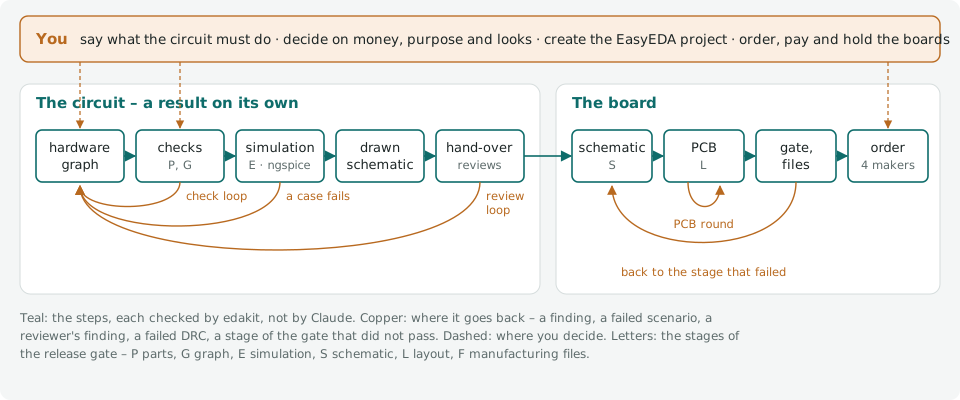
Two stations
The circuit. You say what the circuit must do. Claude writes it as a hardware graph: parts, nets, pins, each part with its datasheet's limits. edakit checks it, simulates it and draws the schematic. The circuit is handed over in writing, a result on its own: enough to wire by hand, build on a perfboard or put into a document.
The board. From the hand-over, Claude draws the schematic and the PCB in EasyEDA Pro or KiCad, routes it and releases the manufacturing files. A release gate checks those files, not the drawing. The order goes into a maker's cart at JLCPCB, PCBWay, Eurocircuits or AISLER. You order and pay.
Who does what
The walkthrough takes the smallest board through every step. Of its 14 steps, you act in six:
| Step | Who | |
|---|---|---|
| 1 | Set up | you answer, Claude writes |
| 2 | What it must do | you and Claude |
| 3 | Parts | Claude |
| 4 | Circuit | Claude as the circuit designer |
| 5 | What the checks found | Claude proposes, you decide |
| 6 | Stock and cost | Claude |
| 7 | Drawing and hand-over | Claude |
| 8 | Reviews | the reviewers, in sessions of their own |
| 9 | The gate offline | Claude |
| 10 | EDA project | EasyEDA: you, once; KiCad: edakit |
| 11 | Layout | Claude as the PCB designer, in its own session |
| 12 | Release | Claude |
| 13 | Order | Claude up to the cart, you order and pay |
| 14 | Acceptance | you, with the boards in your hand |
How it is checked
Claude proposes. Checks that are not Claude decide whether it holds: the rules of the catalog, the simulation, the PCB's design rules, the gate on the exported files. Reviewers judge what a rule cannot see. You decide where a decision is due.
Every step loops back when it fails:
- The check loop. A finding of
edakit checkor a failed scenario ofedakit simsends the circuit back to the graph. It is fixed, or accepted with a reason you agree to. - The review loop. The electrical, regulatory and layout reviewers return numbered findings. Each is fixed or decided before the sign-off.
- The PCB round. Placement, routing and the design rules repeat until the board is clean and its reviewer agrees.
- The gate. A stage that fails sends the work back to that stage. Nothing is released while one fails.
A decision round
Where a decision is due, Claude asks in Claude Code's question form, the recommended alternative first and the consequence of each. From the walkthrough's third decision, shortened:
PATH.reverse on LED_SW: a CR2032 put in upside down reaches R1 and D1. Protect against it?
- No protection (recommended): D1 blocks, the simulation shows 3.2 V against its rated 5 V.
- A Schottky diode in series: costs about 0.3 V, the margin a used cell needs for 1 mA.
No protection
D-3 written to docs/decisions.md; PATH.reverse accepted on LED_SW with that reason.
The answer goes into the project's decision log with its reason and date. The place where it applies names its number.
What it does not give you
A guarantee. You get a check for every error class edakit knows, a list of what a reviewer judges and by whom, and an acceptance test after delivery for the rest. The regulatory review is support, not legal advice: nothing in it is legally guaranteed, and it may be wrong.
State
What runs offline and what has run live, so that you know how close it is.
- Ordering. edakit and Claude in Chrome put a released board into the maker's cart and stop there. Nothing orders
or pays. Live at all four makers (live runs), and the first real order went
through it: pytree's tree at JLCPCB. No order has gone through
edakit cart actualyet. - EasyEDA. Live in throwaway projects: the auto-layout's positions, own footprints as data, the DRC's rule set, designators at a fixed spot, the ODB++ export (handbook 4.5, 7.4, 7.5, 7.7). Creating the EasyEDA project stays a click by hand (upstream lists each click).
- The circuit as TOML. Built and tested on the examples and the reference circuits. The Christmas bell's five boards were released on it. A JSON graph keeps working.
- KiCad. Tested in CI against KiCad 10. The 555 blinker of the KiCad walkthrough went through it to a release.
- Limits. Two copper layers. The simulation runs DC operating points, the transient scenarios of plug, unplug and switch-over, and small-signal AC for audio and guitar circuits where an expectation is named. Spikes and fast edges are left to the acceptance test.
- Versions. Every change comes as a version with its own number, 1.0.0 at the first order. The
changelog says what each changed and what a project has to do when the middle number goes up.
edakit --versionnames the one that runs. - Licences. easyeda-mcp-pro 1.11.0, as pinned, is MIT (since 1.7.0; 1.1.0 to 1.6.0 were PolyForm Noncommercial). EasyEDA Pro is proprietary, Freerouting GPL-3.0, ngspice BSD. None of them is bundled.
Future work
Three changes would alter how a project works; smaller ones are not listed.
- Ordering through the makers' interfaces. Through a maker's API the steps up to the cart would run without a browser, with the same checks. You still order and pay. What each maker offers: handbook 8.4, "Future work".
- The circuit in a language of its own. A notation of edakit's own instead of the TOML graph, compiled to the graph the checks read. Blocks take parameters, and a second board is a few lines on top of the first. What it would be: circuit-dsl.
- Claude independence. Today the plugin runs in Claude Code. Made portable, it would run in GitHub Copilot, Qwen Code, Mistral Vibe and OpenCode too, or with a model on your own machine where the evals show it works. What it takes: claude-independence.