7 Draw and hand over
After this step you have your circuit as a drawing, and whoever lays out the board has what they must know.
What you do
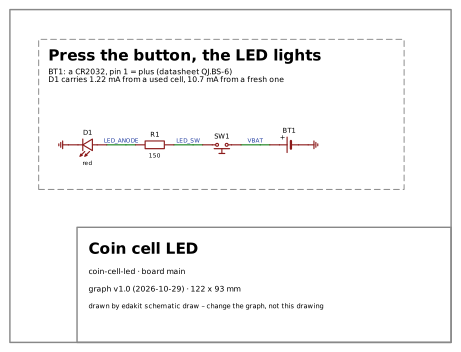
Look at the drawing. Claude draws the schematic from the circuit's text alone, without EasyEDA or KiCad:
$ edakit schematic draw
drawn: 4 parts, 3 wires, 2 flags, 122 x 93 mm
…
What you decide
Where you stop. A checked circuit and its drawing are a result of their own: you can wire it by hand, build it on a perfboard or put it into a document. A hand-wired board goes through the same checks. Or you go on to a board.
What you are asked
For a board: what the layout must keep. A part a person touches or looks at gets a fixed place, such as the LED beside its button.
What you have
The hand-over: the fixed parts and the notes for the layout, in writing.
$ edakit handover
board main – the plan keeps this (SYNC.plan: edakit pcb plan, the gate)
  fixed  BT1, SW1, D1
notes for the layout:
…
  - D1 next to SW1: the LED shows the press
Next: Have it reviewed.
Read on
- The walkthrough: Drawing and hand-over
- The handbook: Drawn without an EDA program