A session as a chat: what a person types, what Claude asks¶
A source
This page is a source of edakit – a concept, a prompt or the rules of a session –, shown as it is in the repository. Read it as such; the guides say what edakit does.
Status 2026-11-03: decided and built, asked for by the owner the same day ("beim Herzeigen der GitHub Pages ist mir
aufgefallen, dass die Beschreibung sehr technisch ist … was fehlt ist ein typischer Chatablauf … auch so gelayoutet …
dann sehen die potentiellen Anwender, dass das wirklich im besten Fall ein Auftrag und ein paar Fragen sind, die zu
beantworten sind"). Written against main at ae2b400. A prototype of page, parser and styles is in
prototypes/session-chat. Decided the same day in a decision round in Claude Code's
form (the table at the end): decisions 1, 2, 3 and 5 as recommended; decision 4, the format, and what Claude set itself
left to Claude by the owner the same day ("du wirst für beide eine gute Idee haben") – taken as recommended. Built
2026-11-03 on the owner's word ("setze das konzept session-chat.md um"), S.1 to S.5 in one branch: docs/session.md,
the fence in docs/pages.py (chat_parse, chat_html), the styles in docs/brand/edakit.css,
tests/test_session_page.py, the excerpt on the start page; the format in docs/style.md, "A chat". The live run S.6 the same
day, in a session of the owner's; what it changed is under "The live run", what the build changed under "As built".
Why¶
The site shows what edakit runs, not what a person does. The entry pages – the start page, the quickstart, How it
works, the ten steps – quote 14 outputs of $ edakit … and one exchange between a person and Claude: the five lines of
a decision round in How it works. The steps pages say "What you are asked" as a list of questions, without the answers
and without what comes before and after them.
A visitor who does not know Claude Code reads that as a tool chain to learn: commands, files, codes. What edakit is meant to be is the other thing – you say what the board must do, Claude asks back where only you can decide, and everything else happens without you. The walkthrough proves it on a real board (14 steps, six of them yours, seven decisions), but in 714 lines of a handbook chapter that a visitor does not open.
A chat shows it at a glance: few bubbles on the right, the forms Claude puts in front of you, and the quiet lines of what ran in between.
The yardstick. The chat is text in the repository, the page's source, held by a test to the example's files. Nothing of it exists only in EasyEDA or in someone's head. It also makes visible what is not yet chat – the install, the click in EasyEDA, the new sessions, paying – instead of hiding it.
The proposal¶
1. One page "A session", and a short excerpt on the start page¶
docs/session.md, in the tab Start after the start page: "A session" (Start then has six of eight entries). The walkthrough's board from the first sentence to the cart, as a chat: about 50 entries, ten step dividers that link the steps pages, three pictures from the example. An entry page by the style guide: two paragraphs before the chat, sentences of at most 20 words on average – a chat line counts as a sentence.- The start page gets six lines of it under "What it does": the first sentence, the form as one line, one question of the decision round, "Round, please.", "Stopped at the cart.", and the tally – with the link "the whole session". The start page's budget (120 words before the first picture) is untouched: the excerpt stands below the pictures.
- How it works keeps its decision round; it becomes a
chatfence with the same five lines, so it looks as on the new page.
2. What the chat says¶
- The record, not an invention. Every line comes from the example
examples/coin-cell-led/– itsdocs/decisions.md, its graph, requirements and outputs – and from the walkthrough. Claude's lines are shortened; the page says so once, in its intro, and links the walkthrough for the full story. - Honest about the rest. What a person does outside the chat stands in the chat, set apart ("You, outside the
chat"): the install, creating the EasyEDA project by hand, a new session for the layout, starting
the reviewers, checking the preview, ordering and paying, testing the boards. Each such line is also a requirement
E-… in
upstream/README.mdor a step of the steps pages; when one goes away, its line goes. - A click in EasyEDA gets a footnote (the owner, 2026-11-03): that KiCad does without it, and that it is reported
to EasyEDA so it goes – the issue linked, the same as in the requirement E-… of
upstream/README.md. Today that is one click, File → New → Project (E-1, easyeda-api-sdk#45); its footnote also says that the second, Design → Import Changes, is gone since 2026-11-01 (E-2, #46, TD-37), so it has no line of its own any more. - The tally under the chat: "Your part: 8 messages typed, 15 answers in 5 forms, 6 things done outside the chat." Counted from the entries when the site is assembled, never typed by hand. That is the owner's point in one line – a task and a few questions – and its limits beside it.
- Not legal advice. The reviewers' entry says once that the regulatory review is support, not legal advice (CLAUDE.md, "Regulatory content").
- Order of a new run. The chat follows a session with today's edakit on the example, not the dates of the record: LIM.i on the cell's current comes up in the first decision round (step 5), where a new project meets it, though D-7 was taken after the reviews. The chat names no decision numbers, so the two orders do not clash.
3. The format: a chat fence, turned into HTML on assembly¶
The page's source is Markdown with one fenced block in a small line format – readable as it is on GitHub, where the fence shows as a plain transcript:
--- 5 Decide on what was found
form: Two findings, one to confirm
  ? PATH.reverse: a CR2032 put in upside down reaches R1 and D1. Protect against it?
  - No protection (recommended): D1 blocks, 3.2 V against its rated 5 V.
  - A Schottky diode in series: it costs 0.3 V, the margin a used cell needs.
  > No protection
claude: Written to docs/decisions.md, each with its reason and date.
Seven kinds of entry: --- a step divider, you:, claude:, ran: (what Claude ran, a quiet line), do: (outside
the chat), img: (a picture Claude shows), form: with ? question, - option (the recommended first) and >
answer. Under a do:, an indented line starting with † is its footnote, with links as [text](https://github.com/tgd1975/edakit/blob/main/docs/concepts/done/url). An indented
line continues the entry above.
docs/pages.py turns each chat fence into HTML while it assembles the pages (it rewrites links there already), and
appends the tally. No MkDocs plugin and no Python function in mkdocs.yml: the build stays the two commands of
pages.yml. The prototype's chat.py is that step in 130 lines.
4. The layout¶
In the brand's tokens (docs/brand/tokens.json), in docs/brand/edakit.css, for light and dark:
- You – a bubble on the right in the accent teal, white text.
- Claude – a bubble on the left on the surface colour, a thin line.
- The form – a card like Claude Code's question form: title and count, each question with its options, the recommended one first and darker, the answer right-aligned in teal. A question without options is one row.
- Ran – a small grey line with a left rule, commands in mono; no bubble, so the eye skips it.
- Outside the chat – a dashed box in copper across the width: it must stand out, not hide. Its footnote stands inside the box under a dashed line, small and grey, the issues linked; the line it belongs to ends in †.
- A step – a divider with the step's name, linked to its steps page.
- Pictures – a card on Claude's side, at most 24 rem wide.
At 390 px the bubbles take 92 % of the width; nothing scrolls sideways. The prototype's screenshots of the whole
session: out/session-light.png (900 px, light, up to step 6) and out/session-dark-phone.png (390 px, dark, steps 8
and 9).
A concrete example¶
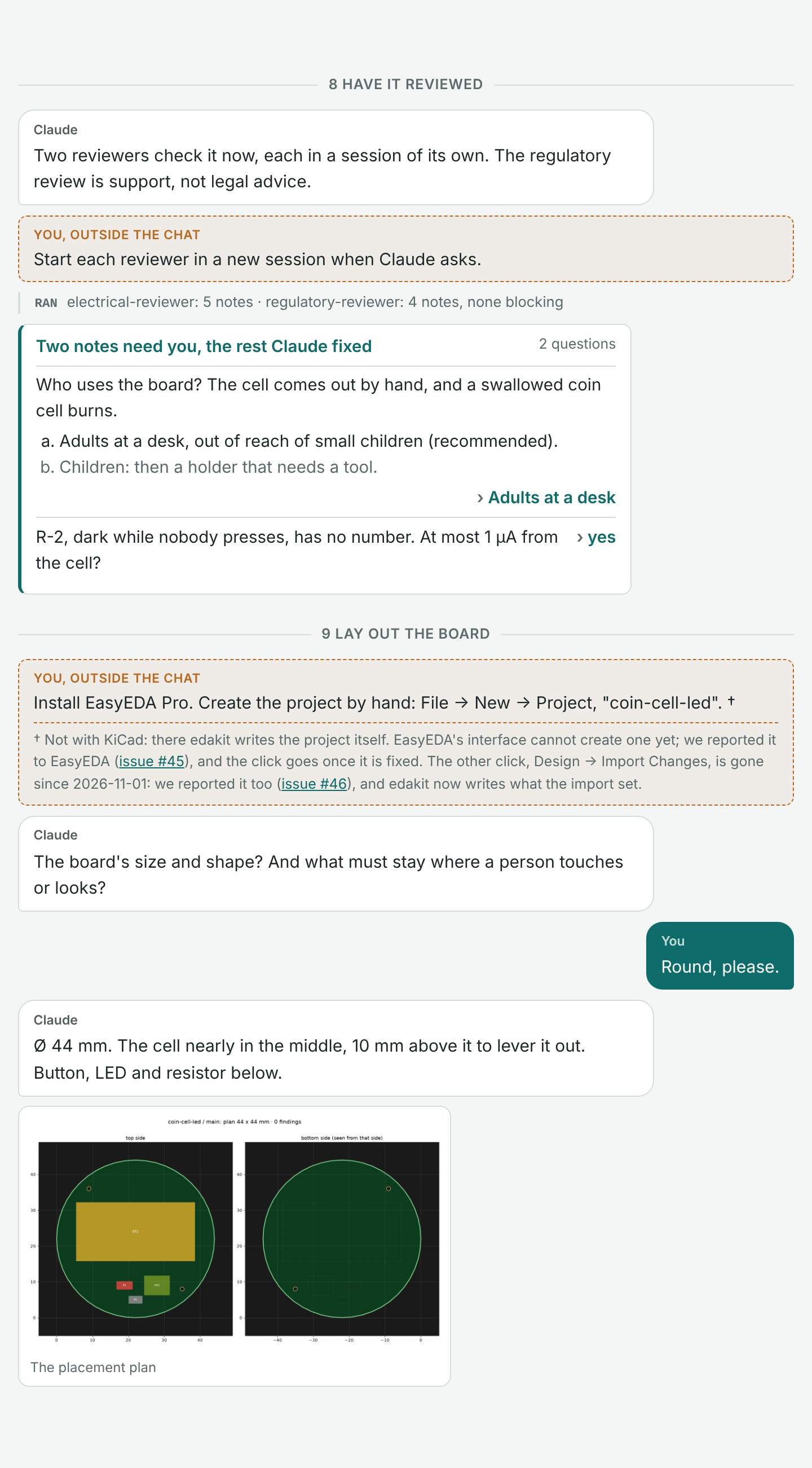
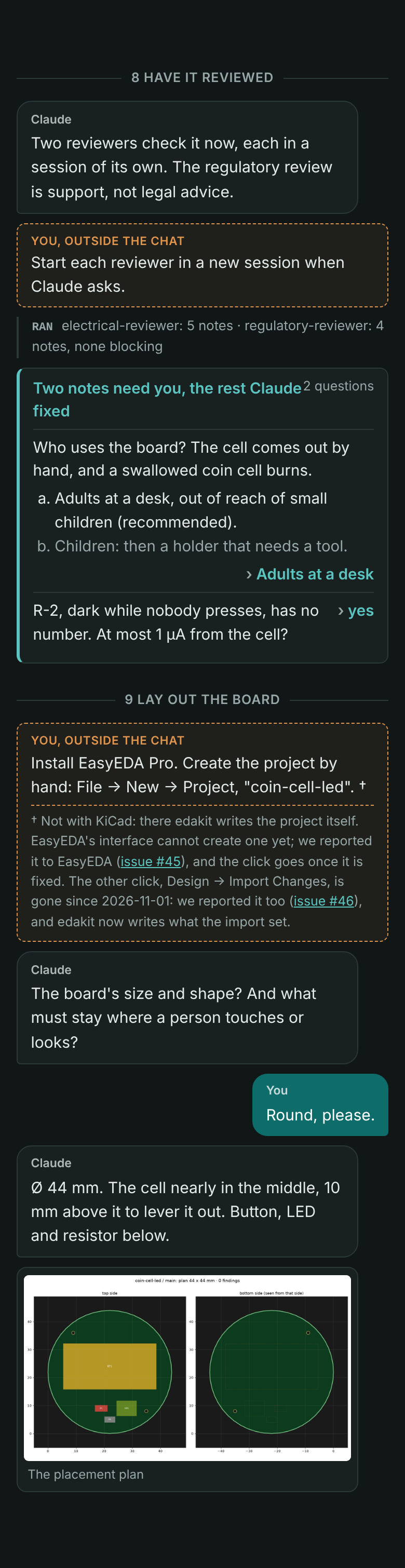
Steps 8 and 9 of the session, shortened – every kind of entry once: a step divider, Claude, you, a form with options and a one-row question, a line of what ran, two things outside the chat – the second, the click in EasyEDA, with its footnote –, a picture. The source, as it stands in the page's Markdown (prototypes/session-chat/example.md):
--- 8 Have it reviewed
claude: Two reviewers check it now, each in a session of its own. The regulatory review is support, not legal advice.
do: Start each reviewer in a new session when Claude asks.
ran: electrical-reviewer: 5 notes · regulatory-reviewer: 4 notes, none blocking
form: Two notes need you, the rest Claude fixed
  ? Who uses the board? The cell comes out by hand, and a swallowed coin cell burns.
  - Adults at a desk, out of reach of small children (recommended).
  - Children: then a holder that needs a tool.
  > Adults at a desk
  ? R-2, dark while nobody presses, has no number. At most 1 µA from the cell?
  > yes

--- 9 Lay out the board
do: Install EasyEDA Pro. Create the project by hand: File → New → Project, "coin-cell-led".
  † Not with KiCad: there edakit writes the project itself. EasyEDA's interface cannot create one yet; we reported
  it to EasyEDA ([issue #45](https://github.com/easyeda/easyeda-api-sdk/issues/45)), and the click goes once it is
  fixed. The other click, Design → Import Changes, is gone since 2026-11-01: we reported it too
  ([issue #46](https://github.com/easyeda/easyeda-api-sdk/issues/46)), and edakit now writes what the import set.
claude: The board's size and shape? And what must stay where a person touches or looks?
you: Round, please.
claude: Ø 44 mm. The cell nearly in the middle, 10 mm above it to lever it out. Button, LED and resistor below.
img: ../../examples/coin-cell-led/docs/pcb_plan_main.png | The placement plan
What the site shows, rendered by the prototype's chat.py with chat.css – on a desktop at 720 px in the light
scheme, on a phone at 390 px in the dark one:
| Desktop, light | Phone, dark |
|---|---|
 |
 |
The HTML docs/pages.py writes for it, in part – one class a kind of entry, nothing inline, so the styles live in
docs/brand/edakit.css alone:
<div class="chat">
<div class="chat-step"><span>8 Have it reviewed</span></div>
<div class="chat-do"><span class="chat-do-label">You, outside the chat</span><p>Start each reviewer …</p></div>
<div class="chat-ran"><span>ran</span> electrical-reviewer: 5 notes · …</div>
<div class="chat-form"><div class="chat-form-title">Two notes need you, the rest Claude fixed<span>2 questions</span></div>
  <div class="chat-q"><p>Who uses the board? …</p>
    <ol><li class="chat-rec">Adults at a desk, … (recommended).</li><li>Children: …</li></ol>
    <p class="chat-a">Adults at a desk</p></div>
  <div class="chat-q chat-q-row"><p>R-2, dark while nobody presses, …</p><p class="chat-a">yes</p></div></div>
<div class="chat-do"><span class="chat-do-label">You, outside the chat</span><p>Install EasyEDA Pro. … †</p>
  <p class="chat-note">† Not with KiCad: … (<a href="https://github.com/easyeda/easyeda-api-sdk/issues/45">issue #45</a>) …</p></div>
<div class="chat-msg chat-you"><span class="chat-who">You</span><p>Round, please.</p></div>
<figure class="chat-img"><img src="…/pcb_plan_main.png" alt="The placement plan"><figcaption>The placement plan</figcaption></figure>
</div>
An excerpt like this one gets no tally; the tally stands only under a whole session, one that starts with step 1.
5. The test¶
tests/test_session_page.py, like the steps' test holds quoted outputs:
- every fence parses; every step divider names a steps page;
- every code (
PATH.reverse,LIM.i) is in the catalog; every/edakit:command is a skill; everyedakit …command exists; - every number with a unit in a Claude, form or ran line appears in the example's files or in chapter 17 (1.22 mA, 10.7 mA, 52.60 USD, Ø 44 mm …);
- every
do:line is matched by a requirement E-… ofupstream/README.mdor by a "What you do" of a steps page; ado:with a click in EasyEDA has a footnote, and its issue is the one its E-… row names – a row whose click is gone ("none") fails the test while its line still stands; - the page within the entry register of
tests/test_style.py.
The chat, as drafted¶
The full draft is prototypes/session-chat/session.md. Its course, by step:
| Step | You | Claude asks | Outside the chat |
|---|---|---|---|
| 1 Install | – | – | the plugin, uv, ngspice, once |
| 2 Start a project | the idea in one sentence; "ok" | one form, 8 questions | – |
| 3 What it must do | "fine", "yes", "accept" | 1 mA? 2.5 V? accept the drafts? | – |
| 4 Design | – | – (the red LED, said, not asked) | – |
| 5 Findings | – | one form: PATH.reverse, LIM.i, the red LED to confirm | – |
| 6 Parts and cost | – | one form: who places BT1 | – |
| 7 Drawing | "a board" | stop here or a board? | – |
| 8 Reviews | – | one form: who uses it, R-2's number | start the reviewers |
| 9 Layout | "Round, please." | size and shape? | install EasyEDA, create the project (with its footnote), a new session |
| 10 Order | "Release it and put it into the cart." | one form: shipping | check the preview, order and pay; test the boards |
Steps¶
| Step | What | Size | Waits for |
|---|---|---|---|
| S.1 | The page docs/session.md from the prototype's draft, its place in NAV, the link from the steps index |
S | the decisions |
| S.2 | The fence in docs/pages.py, the tally; How it works' decision round as a fence |
S | S.1 |
| S.3 | The styles in docs/brand/edakit.css; checked at 1440 and 390 px, light and dark |
S | S.2 |
| S.4 | tests/test_session_page.py |
S | S.1 |
| S.5 | The excerpt on the start page | XS | S.1–S.3 |
| S.6 | A live run: a session on a fresh copy of the example, its first questions held against the chat; differences fixed in the chat or reported | S, a session on the owner's machine | S.1, decision 3 |
S.1 to S.5 are one branch and one pull request, a patch (docs/, README.md and the site are outside a project's
reading, but docs/pages.py is code: a fragment all the same). About one session. Each step starts on the owner's word
and comes into TODO.md when it does.
Measures – done when¶
- A visitor on the start page sees, without scrolling past the second screen, one sentence typed by a person and a question of Claude's.
- The session page: at most 1,000 words, the chat's tally under it, every
do:line matched, every number held. - The site's build strict and green; the page right at 390 px, light and dark.
- On GitHub,
README.mdanddocs/session.mdread as plain text without a broken line.
Alternatives¶
- A recorded session, cut and pasted. Authentic, but Claude's real lines are long, the numbers move with each run, and a recording cannot be held by a test. Recommended as the check (S.6), not as the text.
- A video or an animated terminal (asciinema). Shows the pace, but is no text: no search, no test, out of date with
the next version, and against the yardstick. Possible later for the outreach (
outreach.md), not on the site. - Screenshots of Claude Code. Look real, read badly on a phone, cannot be searched or tested.
- Bubbles written as HTML in the Markdown (
md_in_html). No change topages.py, but a page of<div>s that reads badly on GitHub and is easy to break. - The chat inside the steps pages, a piece per page. Each page gains, but nobody sees the whole – the point is that it is short from end to end. A later step, once the fence exists.
- Circuit only (steps 2 to 7). Shorter and without a single click, but it hides the board, which is what most visitors want.
Costs and risks¶
- Work. About one session for S.1 to S.5, the owner's tokens; S.6 a session on the owner's machine.
- Drift. A changed interview or output leaves the chat behind. Held by the test for numbers, codes, commands and
do:lines; the wording of a question is not held – the live run (S.6) and a look once a version. - A promise too good. The chat shows the best case. The
do:lines and the tally keep it honest; the intro says that Claude's answers are shortened, and the walkthrough has the three gate runs and the second review round. - A second format to know beside Markdown. Seven kinds of entry, documented in the style guide's section on entry pages.
Decisions¶
Taken by the owner on 2026-11-03 in a decision round in Claude Code's form, the recommendation first.
| # | Question | Recommendation | Alternatives | Decision |
|---|---|---|---|---|
| 1 | Where | a page "A session" in Start, six lines of it on the start page, How it works' round as a fence | only on the start page; only the page; inside the steps pages | 2026-11-03: as recommended |
| 2 | Which session | the walkthrough's board from the first sentence to the cart | the circuit only (steps 2–7); two chats, a short circuit and a long board | 2026-11-03: as recommended |
| 3 | Where the lines come from | the example's record, shortened, held by a test; a live run checks it once (S.6) | a recorded session, cut; the record alone, no live run | 2026-11-03: as recommended |
| 4 | The format | a chat fence, turned into HTML by docs/pages.py, plain text on GitHub |
HTML bubbles in the Markdown; screenshots | 2026-11-03: left to Claude by the owner; as recommended |
| 5 | What is not chat | in the chat as "outside the chat", with the tally | left out for a shorter page; in a list under the chat | 2026-11-03: as recommended |
Set by Claude and left to it by the owner on 2026-11-03, kept as it stands: the seven kinds of entry; the layout of section 4; the tally's wording; the page's name "A session" and its place after the start page; the budget of 1,000 words; no decision numbers in the chat.
The live run (S.6)¶
On 2026-11-03 the owner typed the chat's first sentence into a session of the plugin 1.1.0 (main was at 1.1.13; the
skills new-project and requirements differ by eight lines) and answered its forms up to the decisions. The session ran
in the Christmas bell's repository and set up a new one beside it, desk-led, which the owner takes on to the cart and
publishes. Held against the chat, up to step 5:
| Step | The chat as drafted | The live run |
|---|---|---|
| 2 Setup | one form, 8 questions | three forms, 12 questions – the repository's place (asked because the session ran in another project), the tool chain, the maker, who solders, sets and finish, purpose, budget, the drawing, the requirements, the size, the names, documents and scripts |
| 3 Requirements | "from 1 mA?", "down to 2.5 V?", accept | how the LED lights (only while held), which cell, which colour, which button; then the drafts accepted in a form |
| 4–5 Findings | the owner decides PATH.reverse and LIM.i | Claude accepted both itself, with their reasons in D-3, and reported it – against agreement 4 of handbook 11.4 ("accepting a warning" is the user's); the skill circuit-design says "accept only with a reason that holds" |
| 8 Reviews | "Start each reviewer in a new session" | Claude started both agents itself, in contexts of their own; nothing for the owner |
| 9 Layout | the EasyEDA project before the layout | the same, asked as the project's first todo while the reviews ran |
Decided by the owner the same day in a decision round in Claude Code's form, each as recommended:
| # | Question | Decision |
|---|---|---|
| 6 | Step 2 in the chat | 2026-11-03: as live – three forms, the first with its options, the others with their questions and answers; the repository's place left out, a session in an empty repository does not ask it |
| 7 | Step 3 in the chat | 2026-11-03: the live run's questions; 1 mA and 2.5 V are Claude's draft of R-1, accepted by the owner |
| 8 | Claude accepting findings itself | 2026-11-03: the skill is fixed on a branch of its own – circuit-design brings every accept of a warning or an error into the decision round; the chat keeps step 5 |
| 9 | What Claude set itself | 2026-11-03: confirmed – step 8 loses its line outside the chat, docs/steps/08-have-it-reviewed.md says Claude starts the reviewers; steps 6 and 9 stay as the record has them |
The tally is now 6 messages typed, 21 answers in 8 forms, 5 things done outside the chat. With the colour asked in step 3, the red LED is the owner's answer, and step 5 has two findings, no third question to confirm Claude's choice.
As built¶
- Three clicks in the footnote, not one.
upstream/README.mdnames three clicks in EasyEDA a session meets today: E-1 creating the project (#45), E-4 importing the bridge extension at the install and each update (#47), and E-17 opening the project tree once after a start (#52). The line of step 9 says "Install EasyEDA Pro and import its bridge extension", and its footnote links all three, with Import Changes (E-2, #46) as gone. The tally stays 6 things. - No decision numbers, no dates in the chat. The footnote says Import Changes is "gone already", without its day:
an entry page has no history (
docs/style.md). - The chat's links are the page's own. MkDocs rewrites no link in raw HTML;
docs/pages.pyturns every link of an HTML tag into one from the page's address since the drawings' thumbnails of handbook 19, and the chat's HTML – steps pages, pictures underfiles/– goes through the same step. The strict build does not see these links,tests/test_session_page.pydoes. - The start page's excerpt has six entries – the first sentence, Claude's line before the form, the PATH.reverse question as a form, the size question, "Round, please.", the cart – and the tally as a sentence under it, held by the test to the count of the whole session, with the link to it.
- On a phone a one-row question puts its answer below it; a long answer ran past the edge at 390 px.
- The style test counts a chat's step divider as a subheading, and the page joins the entry pages there.
- No fragment.
docs/,tests/andREADME.mdare all inNO_VERSIONof.github/versions.py,docs/pages.pywith them: the branch is merged without a version, not as apatch.
A finding on the way¶
docs/steps/09-lay-out-the-board.md still says "In EasyEDA one click is left for you: Design → Import Changes,
once". By upstream/README.md, E-2, that click is gone since 2026-11-01 (TD-37): edakit writes the Channel ID the
import set, and the click is needed only if the DRC still reports the item. A finding for the documentation, for the
owner – not changed here. Settled before the build: main's step 9 says since then that you click nothing there unless
the check still waits for the import.
Sources¶
- edakit at
ae2b400:README.md,docs/quickstart.md,docs/how-it-works.md("A decision round"),docs/steps/*.md,docs/pages.py(NAV, the assembly,markdown_extensions),docs/brand/edakit.css,docs/brand/tokens.json,docs/style.md,docs/organisation.md. - The record:
handbook/17-walkthrough.md,examples/coin-cell-led/docs/decisions.md(D-1 to D-7), the example's pictures. - The counts:
$ edakitat the start of a line andYou:/Claude:in the entry pages, bygrep; the tally by the prototype'schat.py. - documentation-newcomer.md – the steps, the tabs, the entry's budgets; outreach.md – where edakit is shown.